Set up multiple Single Sign-On for 8x8 Admin Console
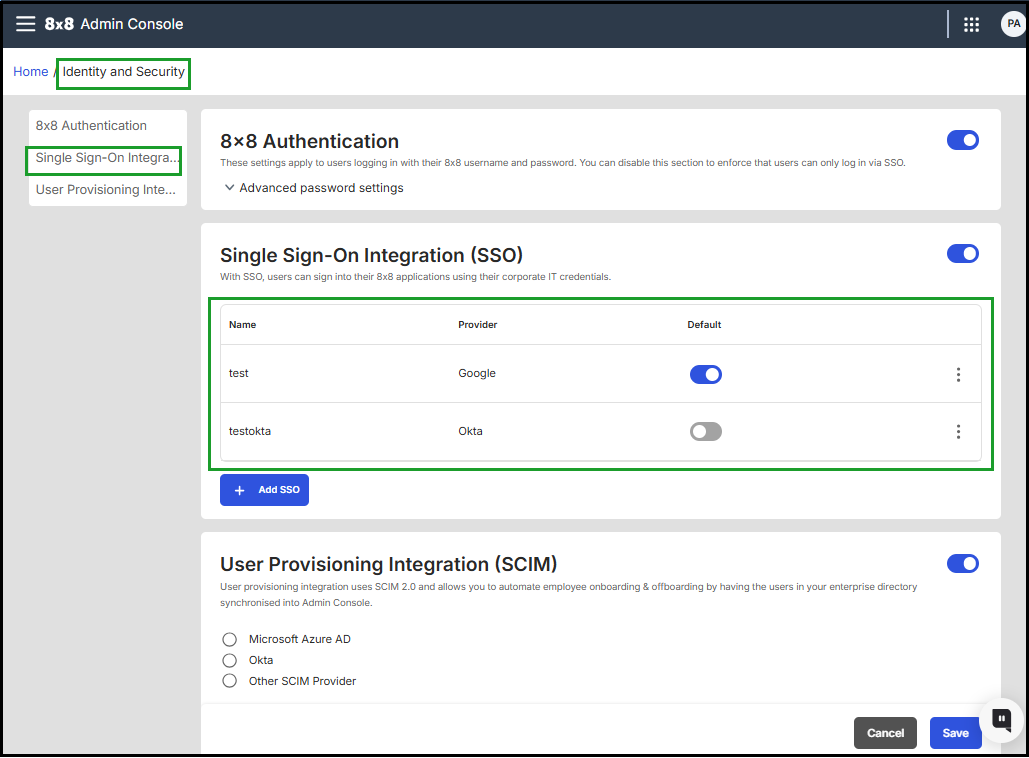
Administrators can configure multiple Single Sign-On (SSO) identity providers in the 8x8 Admin Console.
This feature adds support for multiple SSO integrations, including Okta, Azure AD, Google, Mutual Transport Layer Security (mTLS), and other SAML-compliant providers, offering greater flexibility during mergers, migrations, and across distinct business units.
Benefits
- Support multiple SSO identity providers within the same 8x8 tenant.
- Easily switch or add new providers without interrupting login flows.
- Enable different SSO setups for distinct user groups or acquired companies.
- Simplify transitions during migrations or organizational changes.
- Simplifies identity management across complex organizations, enabling smooth, secure transitions and unified access control.
Note: A user can only be assigned to one active SSO provider at a time.
Example of use cases
-
Post-Acquisition Onboarding
When Company A acquires Company B, and each uses a different SSO provider, both configurations can remain active during the transition period.
Before fully migrating Company B’s users to Company A’s SSO infrastructure, Company A can move Company B’s users to 8x8 communication tools using their existing SSO provider.
With Multiple SSO Providers, Company A can temporarily assign users to their original authentication system, ensuring immediate access to 8x8 applications without waiting for the full SSO migration to complete.
This enables a smooth, secure, and uninterrupted transition between systems.
-
Independent Business Units
Organizations with multiple divisions or subsidiaries—each using separate Identity Provider (IdP) instances, such as Azure AD—can assign a different SSO provider to each group.
This allows independent teams to maintain their own authentication systems while still accessing shared 8x8 apps and services across the organization.
Helpful Notes
- Each user can be assigned to only one active provider.
- The login experience does not change for users.
- This configuration supports federated identity management with SAML 2.0–compliant providers.
Learn More
- Set up Single Sign-On for 8x8 Admin Console
- Set up user provisioning integration
- Mutual Transport Layer Security integration
Mutual Transport Layer Security integration
Important!Mutual Transport Layer Security (mTLS) authentication is available only to customers with Multi-SSO integrations.
Starting with Version 1.57.2 8x8 introduces Mutual Transport Layer Security (mTLS), a secure, certificate-based authentication method for Android devices.
mTLS is a mandatory authentication method, enhancing security and compliance for managed or shared Android devices by replacing passwords with zero-touch certificate verification.
Features
- Removes the need for visible credentials on shared devices.
- Reduces risk in frontline and high-turnover environments.
- Available only for customers using Multi-SSO integrations.
- Only one mTLS SSO provider can be active per account.
Benefits
- Stronger authentication: Only verified Android devices can access 8x8 services
- Improved compliance: Helps meet strict security and regulatory standards
- Secure mobile access: Uses certificates instead of passwords to authenticate users on managed devices
Why this change
Traditional login methods on shared or managed Android devices present multiple challenges:
- Security: Passwords can be reused or exposed on shared devices
- Productivity: Login prompts interrupt frontline workflows
- IT overhead: Managing passwords and user access increases support demands
- Compliance: Shared logins make it harder to track access and maintain audit trails
To address these issues, 8x8 now offers passwordless, certificate-based authentication through mTLS for customers using Multi-SSO.
How mTLS authentication works
- IT deploys a device certificate using a supported Mobile Device Management (MDM) platform (for example, VMware Workspace ONE, Microsoft Intune, SOTI).
- The device authenticates automatically using its certificate. No login screen is required.
- The device receives secure tokens to access 8x8 services.
- If the device is lost or stolen, IT can immediately revoke the certificate.
Behind the scenes:
- Each certificate is mapped to a specific user ID
- The certificate is validated against your organization’s Certificate Authority (CA)
Is mTLS right for your organization?
- mTLS authentication is recommended if your organization:
- Uses shared or managed Android devices (for example, Zebra, Samsung, Honeywell)
- Relies on Mobile Device Management (MDM) platforms like VMware Workspace ONE, Microsoft Intune, or SOTI
- Supports frontline or deskless workers in retail, logistics, healthcare, or warehouse environments
- Requires strict credential management and access control
- Operates in high-turnover environments where password exposure is a risk
Benefits by stakeholder
| Stakeholder | Benefit |
|---|---|
| End users | Frictionless access - devices are ready to use, no login required |
| IT admins Security teams Operations | Centralized control via MDM, fast revocation of compromised devices |
| Security teams Operations | Passwordless authentication, device binding, and audit trail for compliance |
| Operations | Fewer support tickets and faster onboarding for new users |
Note: Compatible with all X Series licenses, including Retail Nationwide.
Prerequisites
To use mTLS authentication, your organization must have:
- 8x8 Work for Managed Devices version 12.6.1 or later
- 8x8 Admin Console version 1.57.2 or later
- A customer account with Multi-SSO enabled
- A Mobile Device Management (MDM) platform that supports certificate deployment (for example, VMware, Intune, SOTI)
- An internal or third-party Certificate Authority (CA)
- IT capability to create and manage certificate profiles
Configure mTLS in 8x8 Admin Console
Administrators can allow users sign in to 8x8 applications using Mutual Transport Layer Security (mTLS) for 8x8 users accessing the service on Android devices.
Note: Only one mTLS identity provider can be configured per 8x8 account.
For detailed mTLS authentication procedure, see Set up Single Sign-On for 8x8 Admin Console - mTLS authentication..


