Understand the differences between Extension Summary and Call Detail Records reports
This section explains why call totals may differ between the Extension Summary and Call Detail Records reports.
Although these reports analyze the same calls, they present the data from different perspectives and therefore use different counting and aggregation logic. Because of this, totals across the reports may not always match.
- The Call Detail Records report provides a consolidated view of a call from start to finish. Each row represents a single call journey, showing the overall outcome of the call.
- The Extension Summary report focuses on activity at the extension-level. It records how each extension involved in a call handled that call, whether the extension belongs to an individual user, a Ring Group, or a Call Queue.
Because these reports focus on different levels of the call flow, they may produce different totals.
When to use each report
The Call Detail Records report is useful when you need to trace the full lifecycle of a call.
Use this report when you want to:
- Trace how a call was routed
- Identify who answered the call
- Review call duration or hold time
- See whether the caller or callee disconnected during the hold
- Investigate transfers, voicemail routing, or other events
The Extension Summary report is useful when you want to analyze extension activity rather than the full call lifecycle. It shows how each extension handled calls during the selected reporting period.
For more information on the Call Detail Records report, see Run the Call Detail Record report
For more information on the Extension Summary report, see Run the Extension Summary report
Key differences:
The Call Legs report provides a complete technical analysis of a call, detailing all the internal routing events that occurred.
The Extension Summary report filters out most internal system activity, focusing only on meaningful extension-level call handling.
The following table summarizes the differences.
| Report | Description | Includes |
|---|---|---|
| Extension Summary | Focuses on extension-level call activity and excludes most internal technical call legs | Calls to or from the PBX Private Branch Exchange—a private telephone network used within a company. that involve extensions Private Branch Exchange—a private telephone network used within a company. that involve extensions |
| Call Legs | Shows the complete technical breakdown of a call | All raw call events, including internal services, transfers, monitoring activity, and more |
Example
Suppose a customer calls Extension 101, and the call is then transferred to Extension 102.
The reports will show the call differently:
- Call Detail Records report: One record representing the single call session
- Extension Summary report: Two entries, one for each extension that handled the call
This behavior is expected and does not indicate a data discrepancy.
Diagram: Call Session vs Call Legs vs Extension Summary
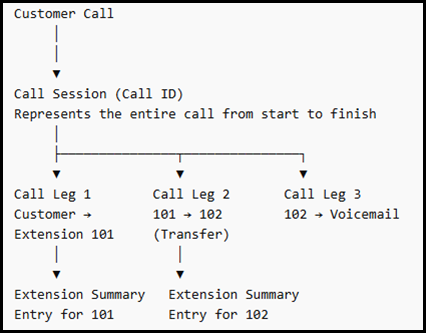
How each report interpret this call:
| Report | What it counts |
Result |
|---|---|---|
| Call Detail Records | Entire call journey | 1 record |
| Call Legs | Every technical step in the call routing | 3 records |
| Extension Summary | Each extension that handled the call | 2 records |
Why totals differ
Because each report analyzes the call from a different perspective:
- Call Detail Records count complete calls
- Call Legs count technical routing events
- Extension Summary counts extension interactions
Therefore, totals between reports should not be expected to match exactly.
Definitions
To avoid confusion, the following terms are used consistently.
| Metric | Definition |
|---|---|
| Call ID (Call Session) |
A single end-to-end call instance. A call session may include multiple call legs, such as transfers, ringing multiple endpoints, voicemail routing, internal services, and more |
| Call Detail Record |
A consolidated view of one call session. Each row represents a complete call and is useful for high-level call analysis rather than examining each call leg individually |
| Call Leg |
A single interaction within a call session, such as Caller → Ring Group, Ring Group → member, or transfer to Auto Attendant. One Call ID can generate multiple call legs, focusing only on extension handling activity such as user, agent, or service interactions. |
| Extension Summary (ES) |
A per-extension view of call activity derived primarily from call legs. It shows what reached a specific extension and how it was handled. |
| Ring Group Summary/ Call Queue Summary |
A service-level view of call handling within a Ring Group or Call Queue. These reports focus on group or queue performance and aggregated outcomes |
Important! Avoid comparing these reports due to differing goals and perspectives:
- Extension Summary with Call Detail Records or Call Legs
- Extension Summary with Call Queues
- Extension Summary with Ring Group Summary
- Call Detail Records or Call Legs with Ring Group Summary
Why calls may not appear in the Extension Summary
Some call legs are intentionally excluded from Extension Summary totals, but they appear in Call Legs.
- The Call Legs report provides a complete technical analysis of a call, detailing all the internal, technical movements of a call within the system, including internal services and routing events.
- The Extension Summary report focuses solely extension activity related to customer calls (inbound and outbound). Internal system services, such as voicemail playback, recording services, or monitoring are not counted.
As a result, some call legs visible in the Call Legs report will not appear in Extension Summary totals.
Exception:
Calls handled by Auto Attendant 444 are counted in the Extension Summary.
Key Differences:
|
Report |
Description |
Includes |
|---|---|---|
| Extension Summary | Focuses only on m extension-level call activity and excludes most internal technical call legs |
Calls to or from the PBX that involve extensions Not included: voicemail playback, recording services, or moniring |
| Call Legs | Provides a complete technical analysis of a call | Includes all the internal routing events that occurred, including internal services, transfers, monitoring activity, and more |
Call leg inclusion by report
| Call leg type | Does it appear in Call Legs? | Is it counted in Extension Summary? |
Example |
|---|---|---|---|
|
External number calls 8x8 DID |

|
|
The customer calls a DID and the call is answered |
|
Extension calls an external client |
|
|
Ext 101 → 0721999888 |
|
Extension → Extension |
|
|
Ext 101 → Ext 102 |
|
Recording services |
|

|
Ext 101 → RecordService |
|
Call monitoring (barge) |
|
|
Supervisor monitoring a call |
|
IVR playback |
|
|
RecordServicePlayIvr |
| Child calls (transfers) |
|
|
Complex Internal routing scenario |
Key principle
The Extension Summary report captures only significant extension interactions with customer calls, whereas the Call Legs report details all technical routing events.
Therefore, differences between the two reports are expected and do not indicate missing data.
Customer setup considerations
Certain system configurations can generate additional call legs that do not appear in the Extension Summary report. These differences are expected if you use any of the following:
Call Recording
If call recording is enabled, each recorded call generates an additional call leg for the recording service.
- Each recorded call creates one additional call leg.
- This leg appears in the Call Legs report.
- It is not counted in the Extension Summary report.
Example:
Ext 101 → RecordService
Monitoring (Barge)
If call monitoring (barge) is used, each monitoring session generates an additional call leg.
- Each monitoring session creates one additional call leg.
- The monitoring leg appears in the Call Legs report.
- It is excluded from the Extension Summary report.
Example:
Supervisor monitoring an active call.
Click to Dial
When users initiate calls using Click to Dial from the app, the system creates an additional technical call leg.
- Each Click to Dial call creates one extra technical call leg.
- This leg appears as an outbound call in the Call Legs report.
- It is not included in the Extension Summary report as an inbound call.
Call Transfers
Frequent call transfers can generate child call legs as the call is routed between destinations.
- Some child legs, such as forked or MasterSlave legs, may not appear in the Extension Summary report.
Exception:
One Number Access (ONA) calls from a Ring Group to agents may still be counted in the Extension Summary.
Key Takeaway
Features such as call recording, monitoring, Click-to-Dial, and complex transfers create additional technical call legs. These legs are visible in the Call Legs report, but they are intentionally excluded from the Extension Summary report, which focuses only on meaningful extension-level call handling.
How the call legs are evaluated
Understand the logic used to determine whether a call leg appears in the Extension Summary.
Extension Summary counts only meaningful extension handling activity. Many technical call legs are excluded or processed without affecting totals.
When analyzing a call leg, verify the following conditions in order:
Step 1. Determine whether the call leg is completely excluded
A call leg is completely excluded if any of the following conditions apply:
- The remote party is 591 (ClickToDial) when the other side is extension 591
- serviceName or serviceType is CellularRedirectService.
- parentCallId contains a value (another callID). Calls with a parent call ID are excluded.
- The call status is Long or Dropped, indicating that the call was dropped by the system.
- The call is a duplicate with the same callId, extId, pbxId, and customerId. Only the first occurrence is retained.
Step 2. Determine whether the call leg is uncounted
A call leg may be processed but not counted in Extension Summary totals if any of the following conditions apply:
- Call forking occurs, indicated by remote party 595 or the callForking flag, and the call status is not InProgress, Missed, or Abandoned.
- The call is unclassified, meaning it is not marked as answered, missed, or abandoned.
- The call is missed to voicemail (
missed=trueandcallToVoicemail=true). - The call uses One Number Access (ONA) (
serviceNameorserviceTypeequalsOneNumberAccess/ONA). - The remote party is 591 (
ClickToDial) - redundant safety check
Exceptions: The following call legs are always counted:
- Auto Attendant calls (
serviceName = CPXMLService) - Auto Forward calls where the connection ID ends with .0
Step 3. Determine whether the call leg is a child call leg
Calls containing a parentCallId are already excluded in Step 1. This section refers only to special call legs within valid calls.
If a call leg is internally marked as a child leg, the following rules apply:
- The call leg is never counted as abandoned.
- It is counted as answered only when the cause is Transfer.
- Talk time is excluded and set to "0".
- Ring time uses the full call duration, from start to disconnect.
- The call leg is counted as inbound or missed only if it is not answered as a transfer and not an uncounted call-forking scenario.
Call Legs scenarios
The following tables illustrate how different call leg types are handled in the Extension Summary report.
Excluded call legs
These call legs are completely excluded from the Extension Summary report.
|
Scenario |
Appears in Extension Summary | What gets counted |
|---|---|---|
| ClickToDial (remote party 591) | No | Not counted |
| Cellular Redirect | No | Not counted |
| Call with parentCallId | No | Not counted |
| Long or dropped call | No | Not counted |
| Duplicate call leg | No | Only the first occurrence is retained |
Uncounted call legs
These call legs are processed but not counted in Extension Summary totals.
|
Scenario |
Appears in Extension Summary | What gets counted |
|---|---|---|
| Call forking (unresolved fork) | Processed but not counted | Not counted |
| Unclassified call | Processed but not counted | Not counted |
| Missed to voicemail | Processed Processed but not counted | Counted in a separate metric, total_call_to_vm |
| One Number Access (ONA) service | Processed but not counted | Not counted |
| Auto Attendant | Yes (exception) | Answered or Missed normally |
| Auto Forward (.0) | Yes (exception) | Counted as missed for the extension |
Child call legs
Child call legs follow special counting rules.
|
Scenario |
Appears in Extension Summary | What gets counted |
|---|---|---|
| Transfer recipient (cause = Transfer) | Yes (partial) | Answered only. Talk time is 0 |
| Ring Group member (answered) | No | Only the Ring Time is counted |
| Ring Group member (missed) Child call leg with call forking | Yes | Counted as inbound and missed |
| Child call leg with call forking | No | Not counted |
Example call scenarios
These examples show the difference in the number of records between Extension Summary, Call Legs, and Call Detail Records reports.
| Scenario | Extension Summary records | Call Legs | Call Detail Records | Notes |
|---|---|---|---|---|
| External number calls a user's DID and the call is answered | 1 | 1 | 1 | Simple call flow |
| External number calls a user's DID and the call goes to voicemail | 1 | 2 | 1 | One leg for voicemail |
| External call to Auto Attendant 1, forwarded to Auto Attendant 2, then routed to a Call Queue where an agent answers | 4 | 5 | 1 | An additional leg is created from the Call Queue to the agent |
| External call to Auto Attendant 1, forwarded to Auto Attendant 2, routed to a Ring Group, two agents miss the call, then voicemail | 5 | 6 | 1 | An additional leg is created for voicemail |
| Extension to extension call with monitoring (barge) | 2 | 4 | 2 | Two extra Barging legs created for monitoring |
| External call to User 1, auto-forwarded to User 2, answered with call recording enabled | 2 | 3 | 1 | An additional leg was created for recording |
| External call to Ring Group, call forks to two agent devices, agent answers and flips the call to another device | 2 | 7 | 2 |
Additional legs created for:
|
| External call to Ring Group with two agents ringing and one answering | 3 | 4 | 1 | An additional leg was created for the Ring Group, connecting to agents |
Explanation
The number of records in the Extension Summary, Call Detail Records, and/or Call Legs reports may differ because each report represents a different perspective of the call flow.
The complexity of a call depends on the system configuration and the call routing path. As calls move through services such as Auto Attendants, Ring Groups, Call Queues, voicemail, recording, and monitoring, additional call legs may be generated.
Because of this behavior, it is expected that the number of records in Extension Summary will not match the totals shown in Call Records or Call Legs.
Valid vs invalid comparisons
Different reports in the analytics system are designed to answer different questions. Because they use different aggregation logic, not all report totals are expected to match.
Valid comparisons
Use the following recommended comparisons when validating call behavior or investigating a specific issue.
| What do you want to analyze | Recommended report/view | Reason |
|---|---|---|
| Investigate a specific call | Call Detail Records (Call Detail Records + Call Legs) | Shows the full call journey and all technical events |
| Evaluate Ring Group performance (answered/missed/abandoned at the group level) | Ring Group Summary | Designed to reflect how the Ring Group handled calls as a service |
| Evaluate Call Queue performance (offered/answered/abandoned at the queue level) | Call Queue Summary | Designed to reflect queue behavior (entries, waits, outcomes) |
| Measure activity at a specific extension — user or service extension | Extension Summary | Best for extension-level activity across all routing sources |
Invalid comparisons
Each report uses a different classification logic. Avoid expecting totals to match between:
- Ring Group Summary and Extension Summary
- Call Queue Summary and Extension Summary
- Call Detail Records and Extension Summary
It is also incorrect to assume that:
Total inbound = Answered + Missed + Abandoned
This equation might not be valid across reports in complex routing scenarios.
The following comparisons are not recommended. They can lead to confusion because the reports measure different aspects of the call flow.
|
Comparison |
Why is it not valid |
|---|---|
| Ring Group Summary vs Extension Summary totals for a Ring Group extension | They answer different questions and may count/attribute different legs (group-entry vs leg-based counting and classification). For details, see Get Ring Group Summary report > Computation scenarios for the Total Calls metric |
| The Ring Group Summary total vs Ring Group report, the Total Calls count |
In the Ring Group Summary report, the Total Calls counts the total number of unique calls received by the ring group extension that were answered or missed. There are cases when the Total Answered/Missed/Abandoned metric is bigger than the Total Calls metric, as the Total Answered/Missed/Abandoned metric counts each interaction with the Ring Group within the same call ID. |
| Call Queue Summary vs Extension Summary totals for the Queue extension |
|
|
Don’t assume totals like the following example match across reports:
|
Some scenarios, such as forwarded, auto-forwarded or unclassified transitions, may be included in total counts but reported differently across reports. This equation might not be valid across reports in complex routing scenarios. |
| Extension Summary vs Call Records |
Each report uses a different calculation logic and is designed to present a specific type of information. The Extension Summary report is based on call legs, while the Call Detail Records report represents complete call sessions. Because of this difference, totals between the reports are not expected to match. Some call legs are not classified as answered, missed, or abandoned, and therefore are not included in Extension Summary totals. Several types of call legs are intentionally excluded from the Extension Summary report, including those generated by:
|
General rules
Use the following guidelines when selecting a report:
- Use the Ring Group Summary or Call Queue Summary report to understand service-level performance and agent activity.
- Use the Extension Summary report to evaluate extension-level activity.
- Use the Call Detail Records report to verify what occurred during a specific call.
- Use the Call Detail Records report when you need to trace a specific call and understand the full call journey.
- Use the Extension Summary report to analyze call handling at the extension level.
- Use the Ring Group Summary or Call Queue Summary report to evaluate service-level performance.
Validate suspected data issues
Use this checklist when numbers appear incorrect. This helps determine whether the difference is expected or indicates a data issue.
Step 1. Start with the correct report
- Ring Group and agent performance: Use the Ring Group Summary report.
- Call Queue and queue agent performance: Use the Call Queue Summary report.
- Extension activity (services, agents or users): Use the Extension Summary report (see the Extension Type metric).
- Call-level validation: Use the Call Detail Records (Call Detail Records and Call Legs) report.
Step 2. Select one or two example calls
- Use the same date and time range
- Note the time zone, ring group or queue name, or extension
- Capture call identifiers
Step 3. Validate at the call level
Use the Call Detail Records report as the source of truth.
-
Confirm the call reached the intended destination (ring group, queue or extension)
-
Review call legs to identify the outcome (such as whether the call was answered, abandoned, sent to voicemail, forwarded, or overflowed).
Step 4. Identify expected differences
-
Determine whether the scenario matches known reporting behaviors
Step 5. Evaluate patterns
- Expected: consistent differences across similar call flows
- Potential issue: sudden spikes, gaps, or missing calls
Step 6. Compare export and UI data
-
Export the report (CSV or XLS)
-
Confirm totals match the UI
Step 7. Escalate with supporting details
When opening a support case, include the following information:
- Time range and time zone
- PBX, customer name or ID, and user
- Reports and metrics involved
- One or two example calls (including timestamps and call IDs or call legs)
- Expected versus observed results
Note: If the issue doesn't match the expected behaviors in this document or have questions about your report, contact 8x8 Support for help.


