What's new in 8x8 Work for Managed Devices 12.6.5 release?
In this release of the 8x8 Work for Managed Devices, we have introduced the following enhancements:
Benefits
- Reduced misdials across sites: Search results are grouped by your assigned site first, so you can identify the correct contact before placing a call.
- Context-rich search results: Results now include extension numbers and site names where applicable, providing the necessary details to identify contacts across various locations.
- Consistent ring group availability: Administrators can prevent users from logging out of assigned ring groups on mobile, ensuring calls are routed correctly and team availability is maintained.
Site-specific search filtering
When you search the company directory, results are now grouped into labelled sections to help you identify the right contact quickly.
| Section | What is shows |
|---|---|
| Your site | Contacts, ring groups, call queues, and auto attendants that belong to your assigned site. These always appear at the top. |
|
Company Directory |
Results from all other sites across the organization, or results with no site assignment. |
To help you quickly identify a contact's location, each search result now includes the site name and extension number (where available).
If no matches are found at your site, the Your site section is hidden. You still have full access to the company-wide directory, and no contacts have been removed.
When you tap to call a ring group, call queue, or auto attendant that belongs to a different site, the app displays a confirmation dialog before placing the call. The dialog identifies the target site by name and gives you the option to confirm or cancel:
- Select Yes to proceed with the call.
- Select No to return to your search results. Your previous search is preserved so you can continue without re-entering your query.
The following behavior is not affected by this feature:
- Searching for individual user contacts returns site-based grouping without confirmation prompts.
- Calling a ring group or call queue within your own site does not trigger a confirmation dialog.
- The overall look and feel of search results remains consistent with the existing design.
To learn more, see About 8x8 Work Managed Devices for Android: Search company directory by site.
Ring group login and logout control
When your administrator enables the Prevent users from logging out of their assigned ring groups setting for your profile policy in Work Apps Settings within the 8x8 Admin Console, the login and logout toggle next to each ring group in the mobile app is disabled. You remain logged in to all assigned ring groups at all times, and calls are routed to you according to your ring group configuration.
The following behavior is not affected by this setting:
- You can still view the list of ring groups you are assigned to in the app.
- Incoming ring group calls ring your device as they normally would.
- Your administrator can still manage your ring group membership from the Admin Console.
- All other mobile app functionality remains unchanged.
To learn more, see Prevent ring group logouts on mobile
What's new in 8x8 Work for Managed Devices 12.6.1 release?
The 12.6.1 release introduces enhanced security for Android users through a new authentication method.
Use Mutual Transport Layer Security (mTLS) authentication for Android devices
8x8 now supports Mutual Transport Layer Security (mTLS) authentication for Android devices, starting in version 12.6.1.
This certificate-based login method strengthens security for managed or shared Android devices, replacing passwords with automatic device-level verification.
What this means for you:
- Available for organizations using Multi-SSO integrations
- Ideal for frontline teams and high-turnover environments
- Requires setup in the 8x8 Admin Console (v1.57.2 or later)
 Benefits
- Stronger authentication: Only verified Android devices can access 8x8 services
- Improved compliance: Helps meet security and regulatory standards
- Secure mobile access: Uses certificates instead of passwords to authenticate users on managed devices
Why we made this change
Traditional login methods on shared or managed Android devices create challenges:
- Security: Passwords can be reused or exposed on shared devices
- Productivity: Login prompts interrupt frontline workflows
- IT overhead: Managing credentials increases support demands
- Compliance: Shared logins complicate audit trails and access control
To solve these issues, 8x8 now supports passwordless, certificate-based authentication via mTLS for customers using Multi-SSO.
How mTLS authentication works
- IT provisions a device certificate using an MDM platform (for example, VMware Workspace ONE, Microsoft Intune, SOTI).
- The device uses its certificate to authenticate automatically - no manual login is required.
- The device receives secure tokens to access 8x8 services.
- If the device is lost or stolen, IT can revoke the certificate instantly.
Behind the scenes:
- mTLS maps each device certificate to a unique user ID
- The certificate is validated against your organization’s Certificate Authority (CA)
Is mTLS right for your organization?
mTLS authentication is recommended if your organization:
- Uses shared or managed Android devices (for example, Zebra, Samsung, Honeywell)
- Relies on MDM platforms like VMware Workspace ONE, Microsoft Intune, or SOTI
- Supports frontline or deskless workers in retail, logistics, healthcare, or warehouse environments
- Requires strict credential management and access control
- Operates in high-turnover environments where password exposure is a risk
Benefits by stakeholder
| Stakeholder | Benefit |
|---|---|
| End users | Frictionless access - devices are ready to use, no login required |
| It admins | Centralized control via MDM, fast revocation of compromised devices s |
| Security teams | Passwordless authentication, device binding, and compliance audit trail |
| Operations | Fewer support tickets and faster onboarding for new user |
Note: Compatible with all X Series licenses, including Retail Nationwide.
Prerequisites
To use mTLS authentication, ensure the following:
- 8x8 Work for Managed Devices version 12.6.1 or later
- 8x8 Admin Console version 1.57.2 or later
- A customer account with Multi-SSO enabled
- A Mobile Device Management (MDM) platform that supports certificate deployment (for example., VMware, Intune, SOTI)
- An internal or third-party Certificate Authority (CA)
- IT capability to create and manage certificate profiles
Configure mTLS in 8x8 Admin Console
- Log in to 8x8 Admin Console.
- Navigate to Home > Identity & Security.
-
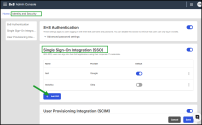
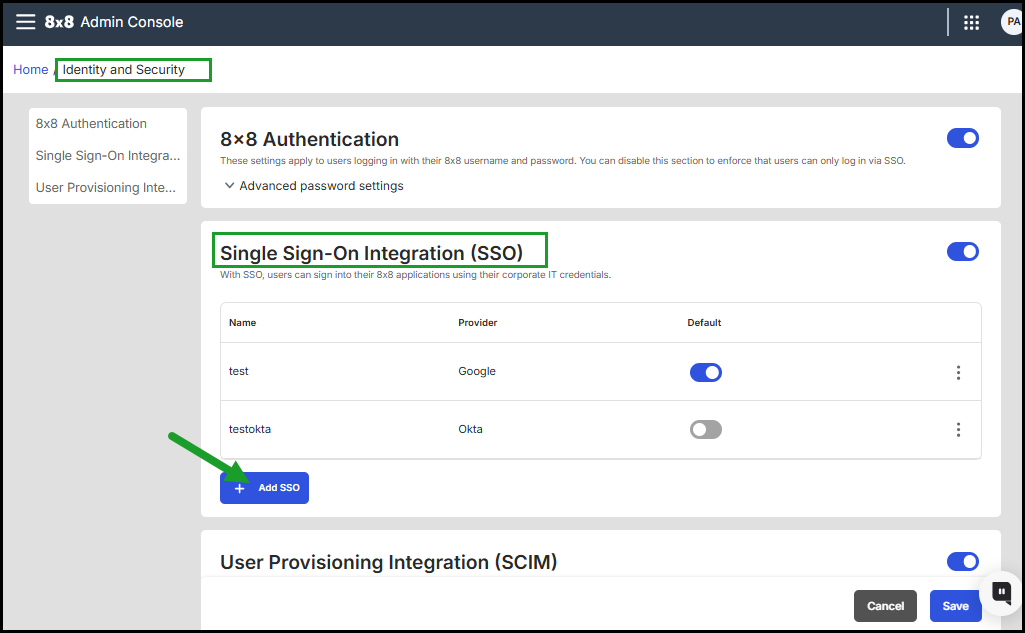
Under Single Sign-On (SSO), click + Add SSO.
-
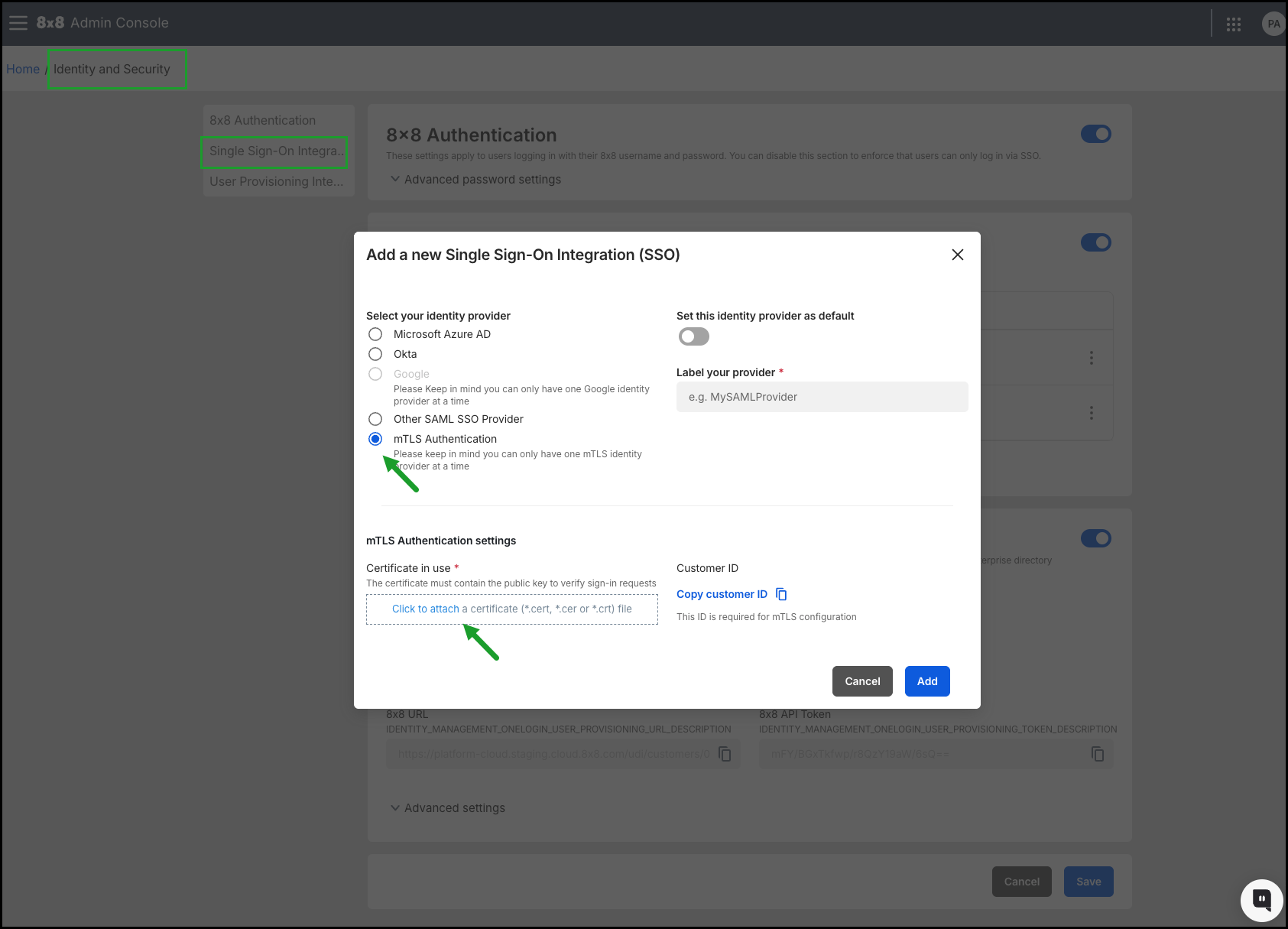
In the Add a new Single Sign-On (SSO) integration dialog:
- Select mTLS Authentication as the identity provider.
- Upload the root Certificate Authority (CA) file in .cert, .cer, or .crt format.
- Copy the Customer ID for MDM configuration (used to match device certificates).
- Click Add.
- Click Save in the Identity & Security page.
Note: Only one mTLS identity provider can be configured per 8x8 account.
For full setup instructions, see 8x8 Admin Console > Set up multiple Single Sign-On for 8x8 Admin Console.
For more information, see About 8x8 Work for Managed Devices for Android - Mutual Transport Layer Security (mTLS) authentication for Android devices.
What's new in 8x8 Work for Managed Devices 12.4 release?
The 8x8 Work for Mobile 12.4 release introduces 8x8 Work for Managed Devices, a new version of 8x8 Work for Mobile designed for administrators.
Introducing the new 8x8 Work for Managed Devices for Android
The 8x8 Work for Mobile 12.4 release introduces 8x8 Work for Managed Devices a new version of the 8x8 Work for Mobile app designed for organizations using Mobile Device Management (MDM) or Mobile Application Management (MAM) tools.
This release provides:
- Secure sign-in: Supports single sign-on (SSO) for easy, password-free login.
- MDM-driven configurations: Tailored for shared device environments.
- Shared device ready: Perfect for retail and enterprise environments.
- Seamless control: Admins can configure and manage app permissions and user settings via the 8x8 Admin Console.
- Flexible and scalable: Works across bring your own device BYOD and company-managed Android devices.
Features
- Built for shared devices: Ideal for retail and enterprise scenarios.
- Enterprise login and security: Supports SAML-based SSO and admin-managed authentication flows.
- MDM/MAM integration: Simplifies secure deployment across both BYOD and corporate-owned devices.
- Session, privacy, and deployment controls: Greater flexibility for IT administrators.
Note: This version is available exclusively on Android.
Benefits
- All-in-one platform: Voice, video, and messaging in one secure app.
- Productivity anywhere: Works online, offline, and across shifts.
- Scalable for any team: From startups to global enterprises.
Where to find it
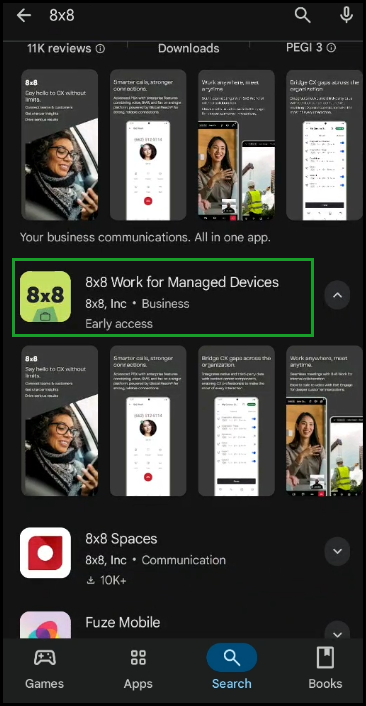
- Available in the Google Play Store with a unique app identifier “-managed” suffix.
- Uses a dedicated app
 icon to distinguish it from the consumer version.
Important: Do NOT install both versions on the same device during transition. Running both can cause instability, degraded performance, and potential data loss.
How it works
- MDM setup: Deploy and configure directly via your MDM console.
- Retail package support: Interfaces with top MDMs, including Microsoft Intune, Manage Engine, Ivanti Neurons, Scoti Mobicontrol, and Hexnode.
- Centralized control: Manage accounts, app settings, and user permissions in the 8x8 Admin Console.
- Flexible licensing: Assign one device per UC license or share across rotating devices.
- Extendable: Scales from small rollouts to enterprise-wide deployments.
Enhancements
- Session management: Auto logout when charging; call queue logout synced with app logout.
- Privacy and security: Control DID number visibility by device role and Caller ID on shared devices.
- User experience: Set default landing tabs by role.
- Deployment: Distinct Play Store package, independent updates, and silent MDM installation.
Deployment steps of 8x8 Work for Managed Devices
For existing deployments
- Uninstall the consumer version of 8x8 Work for Mobile.
- Deploy the 8x8 Work for Managed Devices app version directly from the Google Play Store (connected to your MDM platform).
- Apply the required MDM settings and configure Work App Settings in 8x8 Admin Console
Note: Running both versions on the same device is not supported.
For new deployments
-
Deploy the 8x8 Work for Managed Devices app version directly from the Google Play Store (connected to your MDM platform).
- Deploy the app directly via your preferred MDM platform by connecting the 8x8 Work for Managed Devices version from the Play Store.
-
Apply the required MDM settings and configure Work App Settings in 8x8 Admin Console.
Why it matters
8x8 Work for Managed Devices provides:
- Stronger privacy and session controls for shared devices.
- Simpler role-based configurations.
- Enterprise-ready deployment flexibility with MDM/MAM integration.
- Securely manage mobile apps across BYOD and corporate devices.
To learn more, see About 8x8 Work for Managed Devices.


