Manage Speech Analytics licenses
Administrators can manage Speech Analytics features at the license level in the 8x8 Admin Console. This allows you to control which AI capabilities are available to users based on the licenses assigned to their accounts. Speech Analytics was previously known as Conversation IQ (CIQ).
Note: Speech Analytics was previously referred to as Conversation IQ (CIQ).
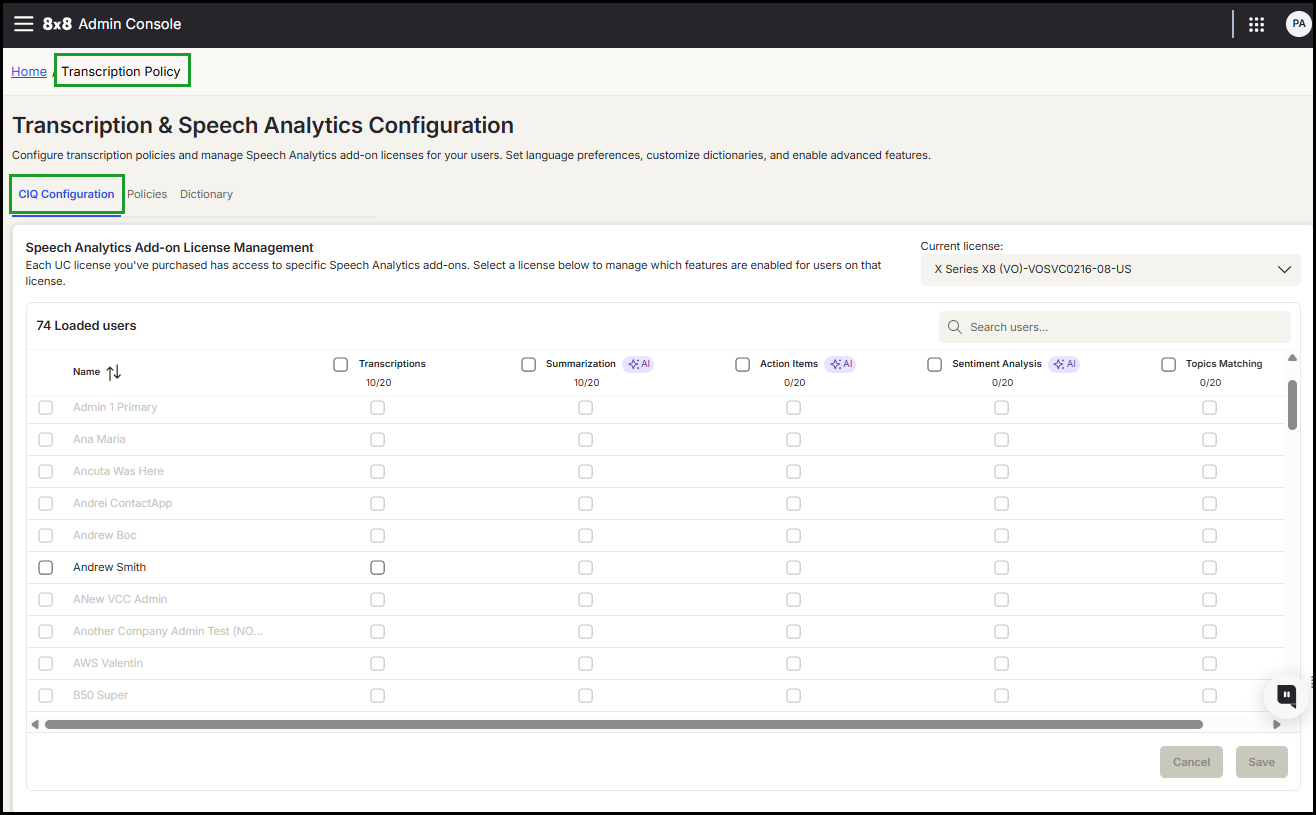
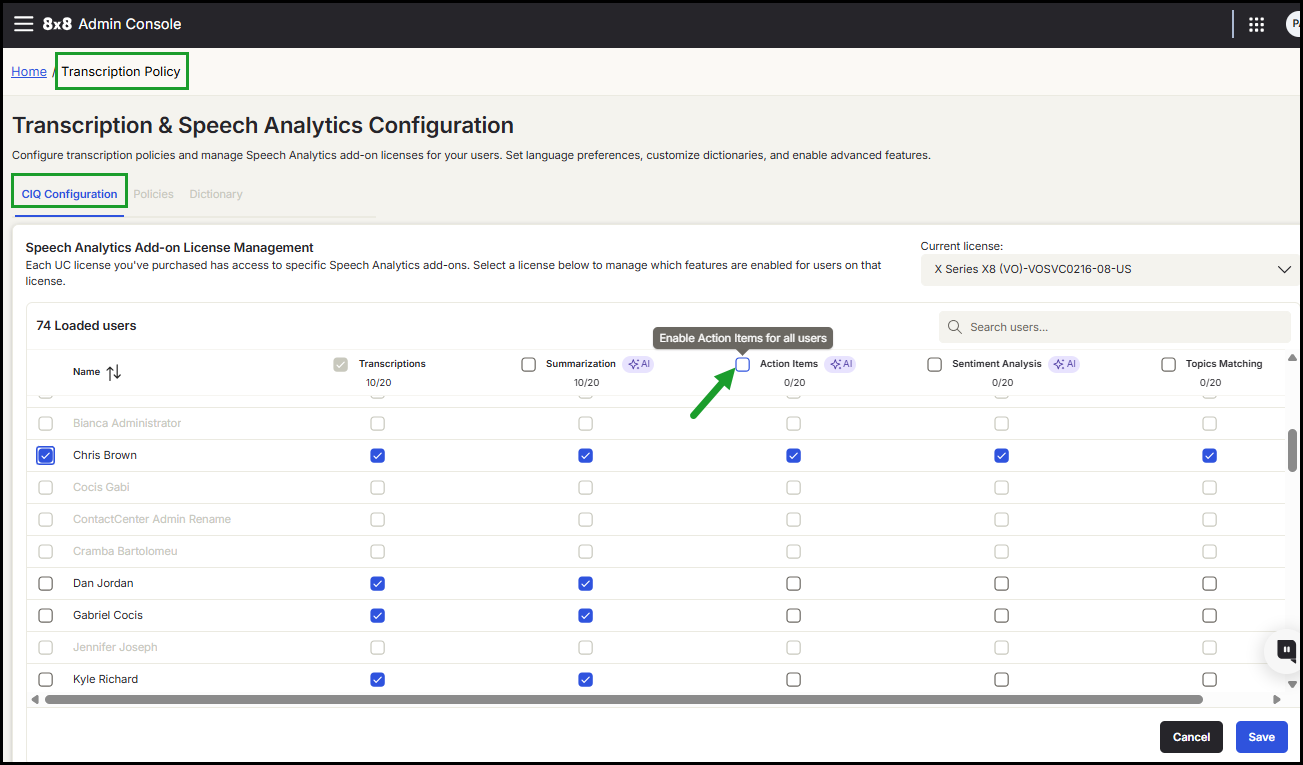
You can access this configuration in Transcription Policy > CIQ Configuration.
Overview
Speech Analytics features — previously known as Conversation IQ (CIQ) — can now be enabled individually instead of being bundled under a single license. This provides greater flexibility when configuring features across your organization.
This functionality is available for users assigned to 8x8 UC X Series licenses.
Available Speech Analytics features
You can enable the following features:
- Summarization: Automatically generate summaries of conversations.
- Action Items: Identify follow-up tasks and commitments.
- Sentiment Analysis: Detect positive or negative sentiment during interactions.
- Topics Matching: Identify conversations that match predefined topics
Important!
- Transcriptions must be enabled before any other Speech Analytics features can be activated.
- Feature availability depends on the assigned license.
- The legacy CIQ license is no longer available for new customers and will be retired after existing customer renewals.
Speech Analytics feature availability
|
Features |
Application | |||
|---|---|---|---|---|
|
8x8 Work for Desktop/Web |
8x8 Supervisor Workspace — Interaction Retrieval | UC Quality Management (QM) and UC Speech Analytics (SA) | 8x8 Admin Console — Recording | |
| Transcription | 
|
|
|
|
| Summarization |
|
|

|
* |
| Action Items |
|
|
|
* |
| Sentiment Analysis |
|
|
|
* |
| Topics Matching | ** |
** |
|
* and ** |
| Quality management |
|
|
|
|
* The feature is anticipated in a future release, specifically in Q1 FY27.
** Customers whose license includes the topics feature will be able to view the top 5 topics.
Notes:
- UC Quality Management (QM) licenses are assigned by administrators on the User Profile page 8x8 Admin Console.
- Access to the UC Quality Management (QM) or UC Speech Analytics (SA) app is available only with the Topics or Quality Management (QM) licenses.
- In 8x8 Supervisor Workspace - Interaction Retrieval, the available features are designed for 8x8 Engage supervisors
Requirements
Ensure the following prerequisites are met:
- You have administrator access to the 8x8 Admin Console.
- Your organization has purchased Speech Analytics add-on licenses.
- The Transcriptions feature is enabled before additional Speech Analytics features can be activated.
Open the CIQ Configuration page
- Go to Transcription Policy in the 8x8 Admin Console navigation menu.
- Open the CIQ Configuration tab.
- Choose a license from the Current license list.
- Scroll to load all users associated with the selected license.
Note: Users associated with the selected license appear as enabled. Users shown in grey belong to other licenses.
Enable Speech Analytics features
Note: Speech Analytics (CIQ) features depend on Transcriptions. Enable Transcriptions before enabling Speech Analytics (CIQ) features.
 Enable features for a single user
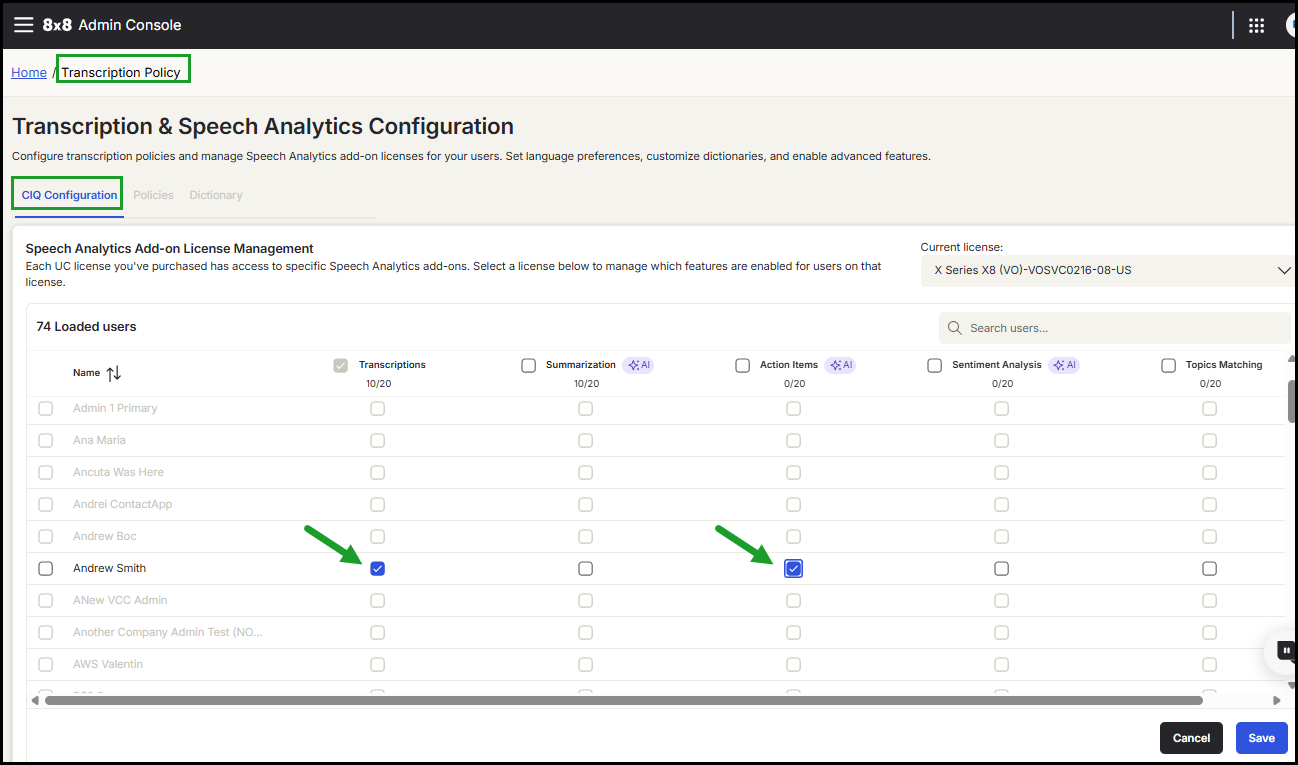
- Go to Transcription Policy > CIQ Configuration.
- Select a license from the Current license list.
- Scroll down the table to load all users.
- Locate the user in the table.
- Enable Transcriptions. All other Speech Analytics features become active.
-
Select the features you want to enable:
-
Summarization
-
Action Items
-
Sentiment Analysis
-
Topics Matching
Note: To select all features for a user, check the box next to their name.
-
- Click Save.
A message appears showing the progress while the changes are saved.
Note: You must first enable the Transcriptions feature to enable additional Speech Analytics features.
 .
.
Enable features for multiple users
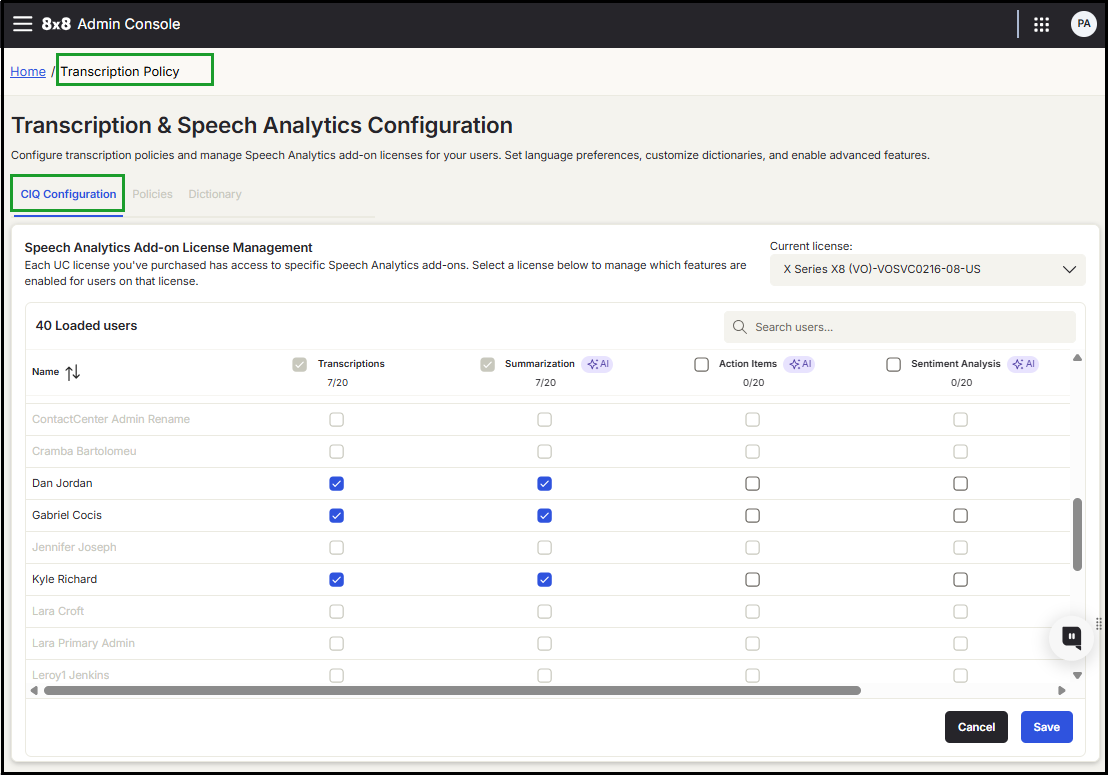
- Go to Transcription Policy > CIQ Configuration.
- Select a license from the Current license list.
- Scroll down the table to load all users.
- Locate the user in the table.
- Select multiple users in the table.
- Enable Transcriptions. All other Speech Analytics features become active.
-
Select the desired Speech Analytics features.
Note: To select all features for a user, check the box next to their name.
- Click Save.
Enable features for all users
- Go to Transcription Policy > CIQ Configuration.
- Select a license from the Current license list.
- Scroll down the table to load all users.
- In the table header, select the Transcriptions checkbox.
-
Optionally select additional features from the column headers.
-
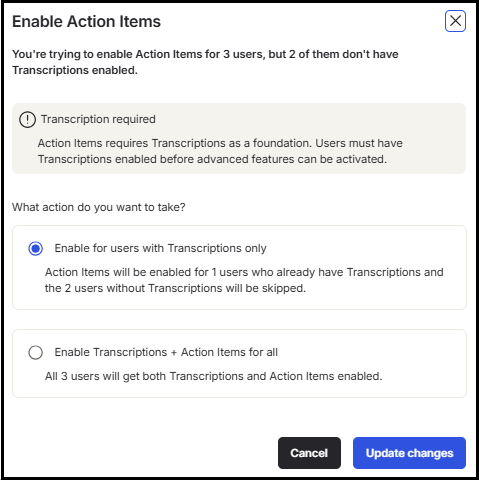
Choose how to apply the changes if prompted:
- Enable Transcriptions only for all users.
Or
- Enable Transcriptions and the select additional features for all users.
-
Click Update changes, then Save.
Disable Speech Analytics features
- Locate the user in the table.
- Clear the checkbox for the feature you want to disable.
- Confirm the action, then click Save.
Note: To disable all features for a user, clear either Transcriptions, or the box next to their name.
Search for a user
Use the Search user  users field in the upper-right corner of the table to quickly locate a specific user.
Notes and limitations
- Only new customers can access the Speech Analytics (CIQ) Configuration tab.
-
The Conversation IQ (CIQ) license is no longer available for purchase by new customers:
- Existing customers retain access until their next renewal.
- At renewal, licenses transition to the new licensing model.
-
The Conversation IQ (CIQ) license will be retired after all existing customers complete the transition.
-
Customers with existing bundled Conversation IQ licenses continue to have access:
-
Renewals and expansions use the following licenses:
- UC Speech Analytics (SA)
- UC Quality Management (QM)
-
- The number of Speech Analytics (SA) and Quality Management (QM) licenses can be configured independently and does not need to match the number of UC licenses.
- For details on license transition and configuration, contact your account representative.
For advanced configuration scenarios, see Configure Quality Management and Speech Analytics for 8x8 Work.


