Run the Unreturned Calls report
The Unreturned Calls report provides visibility into incoming calls that were missed and not returned by any extension within the PBX Private Branch Exchange—a private telephone network used within a company.. This includes calls that were redirected but never returned by the final recipient.
Use this report to quickly identify missed follow-ups and respond to key customers before opportunities are lost.
Note: This report replaces the legacy Unreturned Calls report, including improved filtering, clearer metric labels, persistent settings, and a modernized interface aligned with 8x8 design standards.
Features
- Modern experience: Updated navigation and visuals aligned with 8x8 design standards.
- Improved filtering: Filter unreturned calls by PBX, caller, or callee to narrow results quickly.
- Enhanced search: Quickly locate specific unreturned calls using searchable columns. All the columns are searchable.
- Sortable columns: Sort data alphabetically or numerically in any column.
- Real-time updates: Data refreshes automatically every five seconds.
- Export options: Download reports in CSV or Excel format.
- Persistent settings: Saved filters and column selections remain when navigating away.
- Clearer metrics: Updated labels and tooltips reduce confusion and improve understanding.
Benefits
- Improve customer response time: Quickly identify missed calls that were not returned and follow up with customers.
- Reduce missed opportunities: Gain clear visibility into unreturned calls across your PBXs.
- Simplify monitoring: Use a consistent, modern analytics experience aligned with other 8x8 reports.
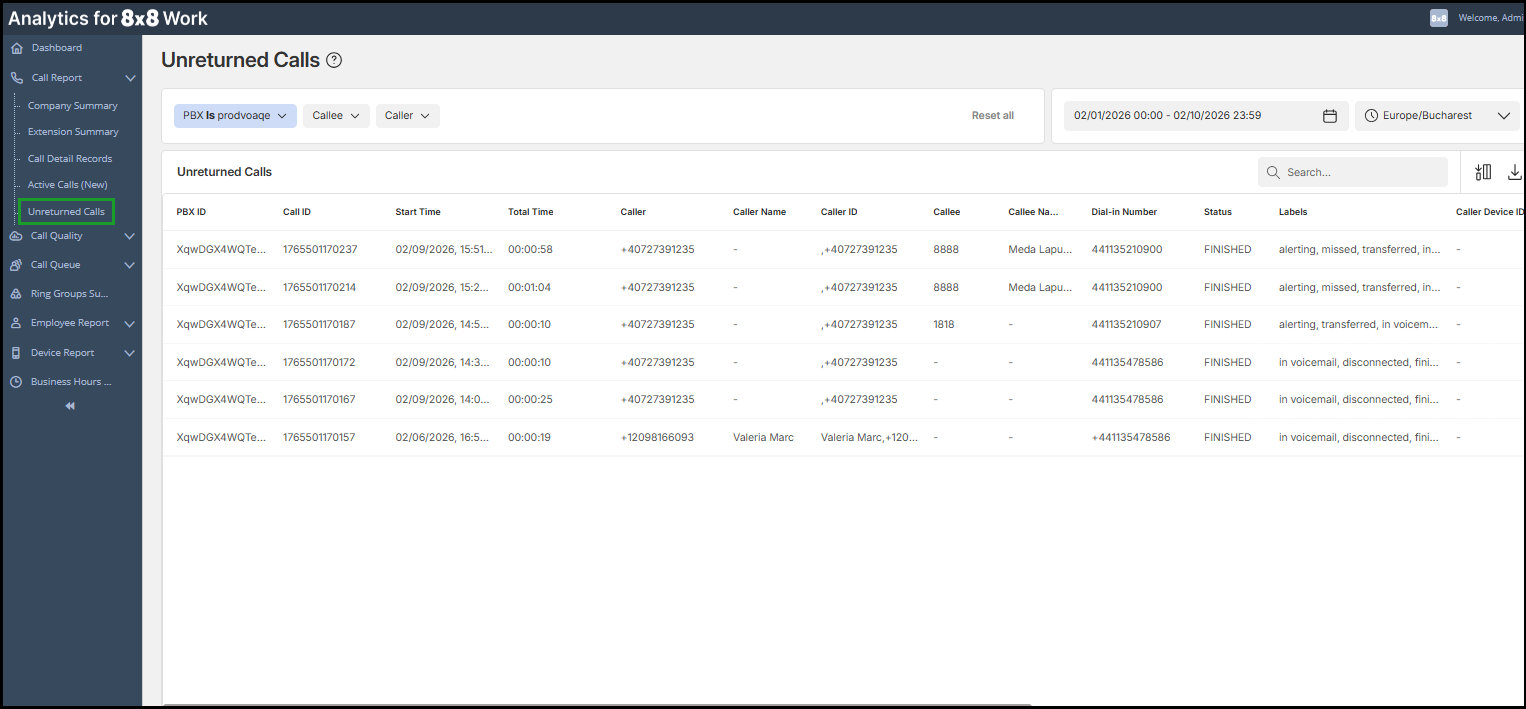
Access the Unreturned Calls report
The Unreturned Calls report is available in 8x8 Analytics for 8x8 Work.
To access the new report:
- Log in to Analytics for 8x8 Work.
- From the left navigation menu, go to Call Report
 > Unreturned Calls.
 -
Use the date range and time selectors to choose your desired date and time range. To learn more, see Customize the report settings.
Note: The report displays data for the past 14 rolling days, even if a longer timeframe is selected.
- Apply filters for PBX, Callee and Caller as needed. To learn more, see Customize the report.
Notes:
- By default, the report displays unreturned calls from the past two weeks.
-Once a call is returned, it is automatically removed from the table.
- To download the report in CSV or Excel format, use Export this file  in the upper-right corner of the table.
Customize the Unreturned Calls report
You can tailor the Unreturned Calls report to focus on the metrics most relevant to your workflow.
Customization options include:
- Filters: PBX, Caller, and Callee
- Column selection: Show, hide, or reorder columns
- Search: Quickly locate specific unreturned calls using searchable columns. All the columns are searchable.
- Sortable columns: Sort any column alphabetically or numerically
- Date and time range: Select preset or custom ranges
- Time zone: Adjust the display to your preferred time zone
Additional tool:
- Reset all: Restore default filter settings with one click.
Notes:
- Persistent settings: Saved filters and column selections remain between sessions
- Export: Save filtered views as CSV or Excel.
To find more about how to customize a report in Analytics for 8x8 Work, see Customize report settings.

Adjust date and time range and time zone
- Use the calendar and time selectors in the upper-right corner to choose the reporting date and time range.
- Use the time zone selector in the upper-right corner to display accurate local operational time.

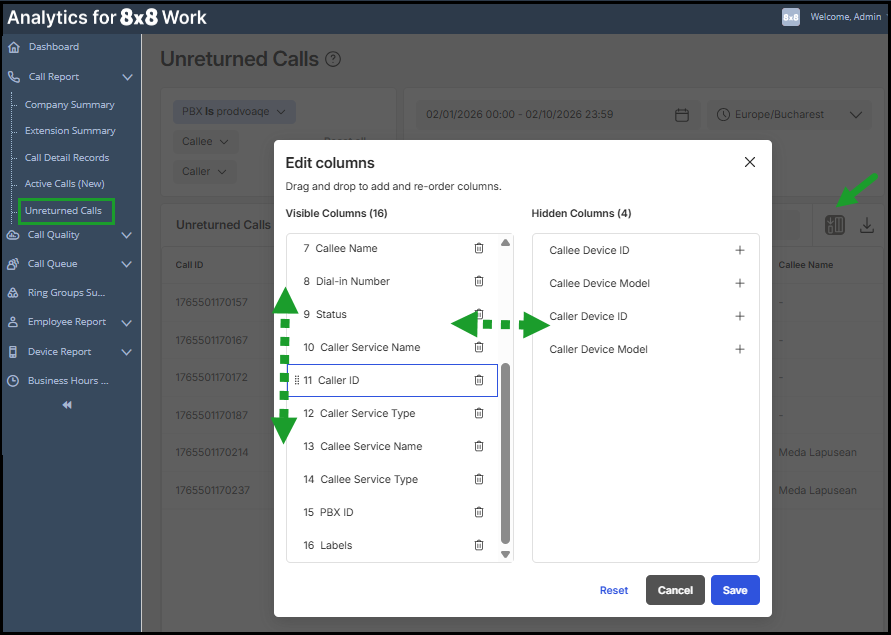
Select visible columns
To customize your table view:
- In the upper-right corner of the call table, click the Edit columns
 icon.
icon. - Drag metrics between Visible and Hidden columns.
- Reorder columns by dragging them up or down.
- Add or remove a column by clicking + or
 next to it.
 - Click Save to apply changes, or Reset to restore the default view.
Search for calls
Use the Search  bar in the upper-right of the table to find calls. All the columns are searchable.
Sort column values
Sort data in any column alphabetically or numerically:
- Click the arrow icon
 in the column header to reorder values.
Glossary: Unreturned Calls
Missed incoming calls are considered unreturned if no extension in the PBX called them back. This includes redirected calls that were not returned by the final party.
| Column | Description |
|---|---|
| Call ID | Unique identifier for a call’s entire journey — it lets you trace the same call across all its legs. |
| Start Time | Time the incoming call arrived on the PBX. |
| Total Time | Total duration of the call until disconnection. |
| Caller | Original external caller number. |
| Caller Name | Original external caller number. |
| Calee | The original called party number. |
| Callee Name | The name of the original callee |
| Dial in Number | The phone number that a caller dialed to contact your company. This number may route directly to a user’s direct number, a Call Queue or a Ring Group, based on the configuration of your phone system. |
| Status | Indicates the status of a call as In Progress (dialing or talking) or completed (ended) |
| Caller Device ID | The device identifier is unique to the caller's device. |
| Callee Device ID | The device identifier is unique to the callee's device. |
| Caller Device Model | Device model used by the caller in this leg of the call. |
| Callee Device Model | Device model used by the callee in this leg of the call. |
| Caller ID | Transmitted caller number and/or name. |
| Caller Service Name | Service associated with the caller, such as Auto Attendant, Ring Group, or ACD Operator, Master Slave, One Number Access, and Click To Dial. |
| Caller Service Type | Service Types, such as Custom, Virtual Extension, Voicemail, Auto Attendant, and Call Park Extension. |
| Callee Service Name | Service associated with the callee, such as Auto Attendant, Ring Group Service, ACD Operator Service, Master Slave Service, One Number Access, and Click To Dial |
| Callee Service Type | Service type associated with the callee, such as Custom, Virtual Extension, Voicemail, Auto Attendant, and Call Park Extension . |
| Call Time | Total duration of this leg of the call. |
| PBX ID | Identifier of the phone system associated with the call. |
| Label | Descriptive call label of the journey. |


