Handle RCS chats
Rich Communication Services (RCS) is a dynamic next-generation messaging protocol integrated directly into your native messaging device. Unlike SMS, RCS supports high-resolution media, file attachments, and interactive content.
Benefits
- Verified brand identity: Messages are sent from a verified business profile, helping users trust the sender.
- Rich Media Cards: Share text, images, videos, and call-to-action buttons in a single message.
- Familiar agent workflow: Agents handle RCS chats just like WhatsApp or other channels in 8x8 Agent Workspace
 The brand new interface for 8x8 Contact Center agents to receive and process customer interactions..
 - Ease-of-use: Customers can start chats through click-to-chat links, QR codes, or buttons on your website or social media.
Requirements
Requires brand verification by the mobile networks. This verification process can take up to six weeks to complete.
Limitations
- RCS chat is currently supported only in the United States, the United Kingdom, and France.
- Outbound RCS are currently not supported.
Accept and respond to RCS chats
When a customer taps a Help or Contact us link on your website, and their device supports RCS, the message opens in their default messaging app and sends as an RCS message.
In 8x8 AgentAgents use the Agent Console to view and manage customer interactions. Virtual Contact Center supports Regular agents and Supervisor agents. Workspace, the incoming message is labeled as an RCS chat. You can reply in real time, share files, and keep the chat open until the customer confirms they’re all set.
To accept an inbound RCS chat:
- Click the status
 menu option and change your status to Available.
 - When a new RCS chat arrives, it appears in the notification panel.
- Preview the record details and click
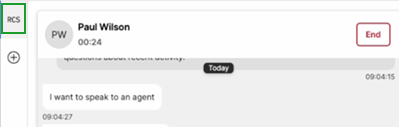
 to accept chat. The chat is labeled RCS in the sidebar.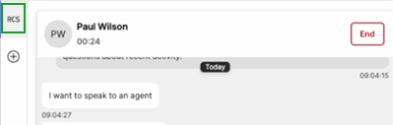
- If the customer has an existing profile, their record or case opens for review.
If it’s a new customer, a record entry form appears. Fill in the required fields and click Save. - Type your message in the chat window. You can share text, images, or videos.
- Click
 to send your message.
 - After finishing the chat, click
 . The timer indicates the time for wrap-up.
 - If required, select a Disposition and click Continue.
- Click Wrap up.
- A chat log may display, depending on your settings.
Note: If the customer replies after the chat ends, the message returns to the Contact Center queue.