Audit events
Administrators can use the Audit events feature to track configuration changes for both 8x8 Unified Communications (UC) and Contact Center (CC) services. This functionality provides oversight of essential details, including the person who initiated the modification, the specific timestamp, the type of action taken, and exhaustive event data. Users with administrative access can review records from the past 90 days, which are accessible for retrieval in 30-day increments.
Important! You must have administrator privileges to access and view audit results.
Features
- View administrative changes made in 8x8 Admin Console and 8x8 Configuration Manager directly in the Audit events section of the 8x8 Admin Console, from a single dashboard.
-
Monitor configuration changes for UC and CC events.
- UC events: changes across users, Auto Attendant, call forwarding rules, call queues, ring groups, Operator Connect, and more.
- CC events: changes across users, agent groups, queues, channels, scripts, and more. (Beta)
- Access audit data across regions for CC events for tenants with multi-region environments.
- Review detailed event information, including the resulting state of affected entities.
How audit events work
Audit events are generated when configuration changes occur in the 8x8 Admin Console or 8x8 Configuration Manager.
Each event includes:
- Timestamp
- Action performed
- Affected entity
- Resulting state after the change
Audit events for 8x8 Admin Console
Administrators can use the Audit events tool to monitor configuration changes made within the 8x8 Admin Console.
Audit events for 8x8 Admin Console administrators can use the Audit events tool to monitor configuration changes made within the 8x8 Admin Console
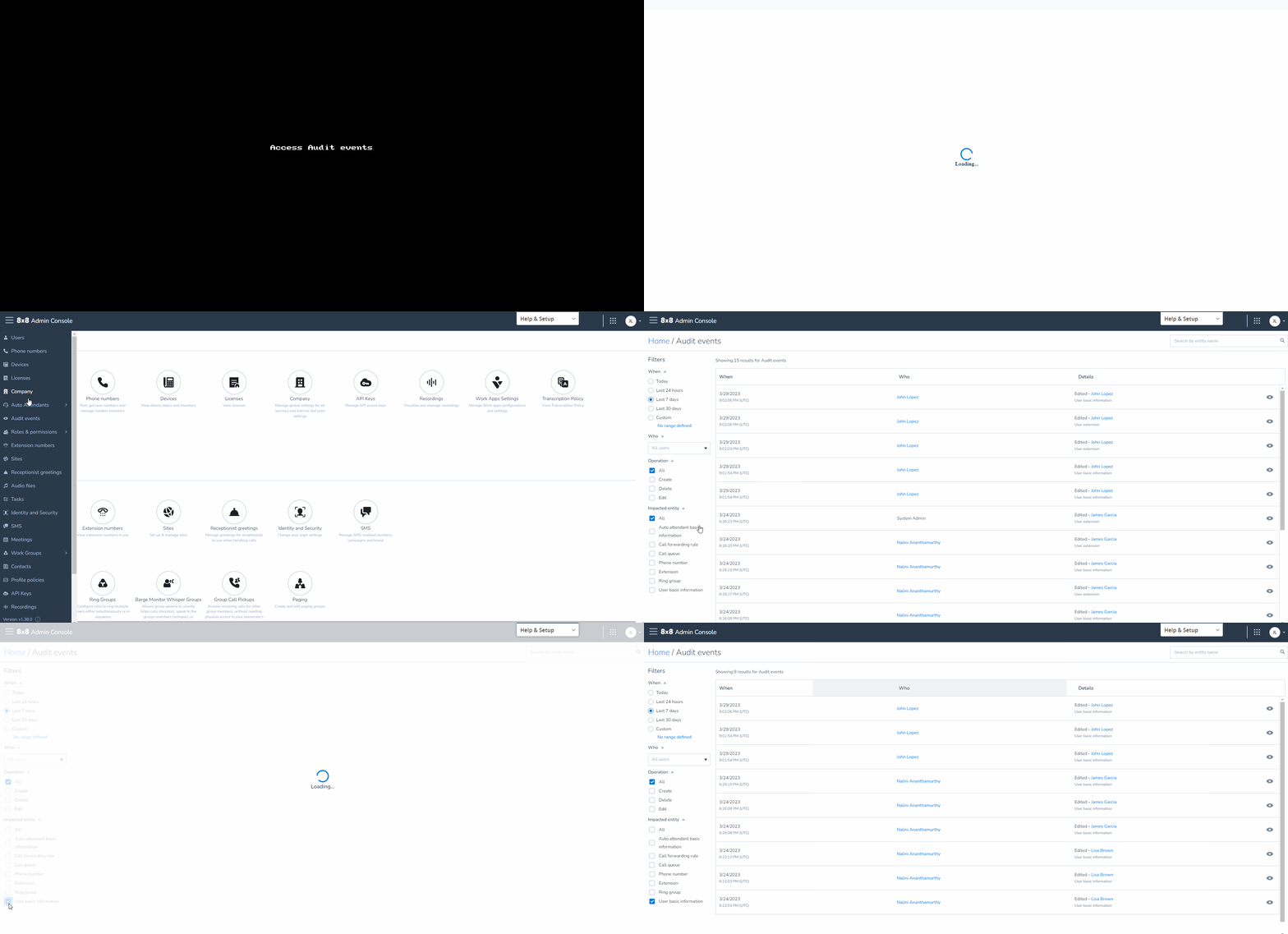
 Access audit events for 8x8 Admin Console
- Log in to your 8x8 Admin Console account.
- From the menu
 , go to Audit events.
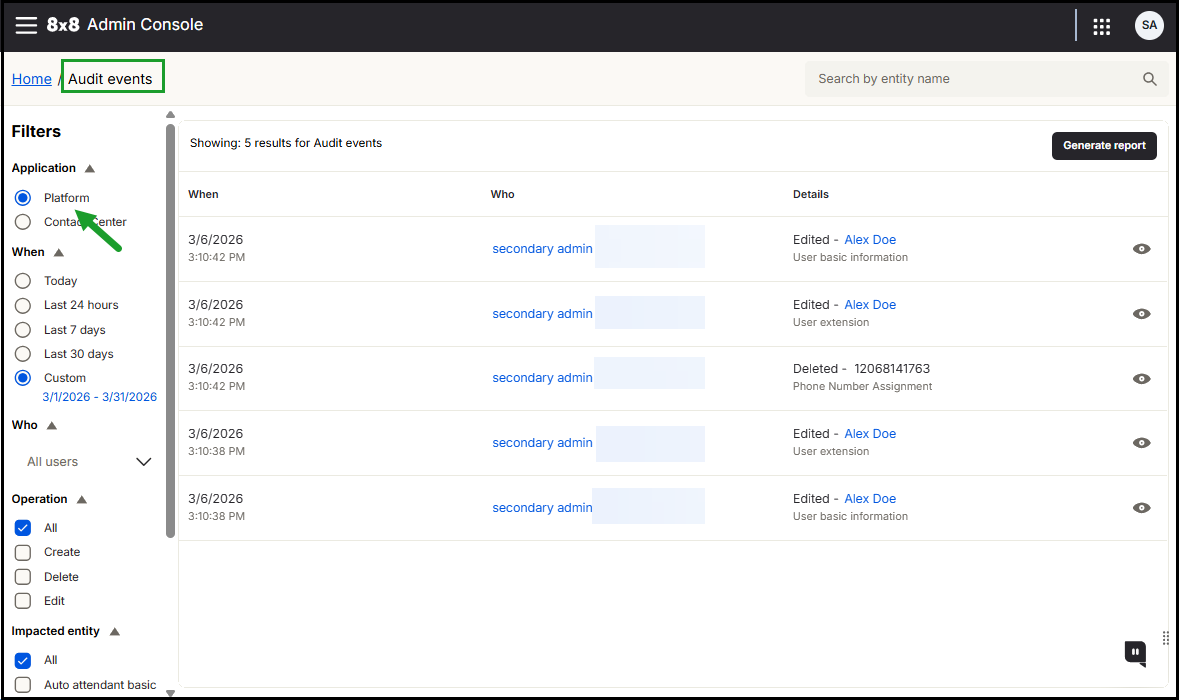
 - On the Audit events page, under Application, select Platform to focus on UC audit data.
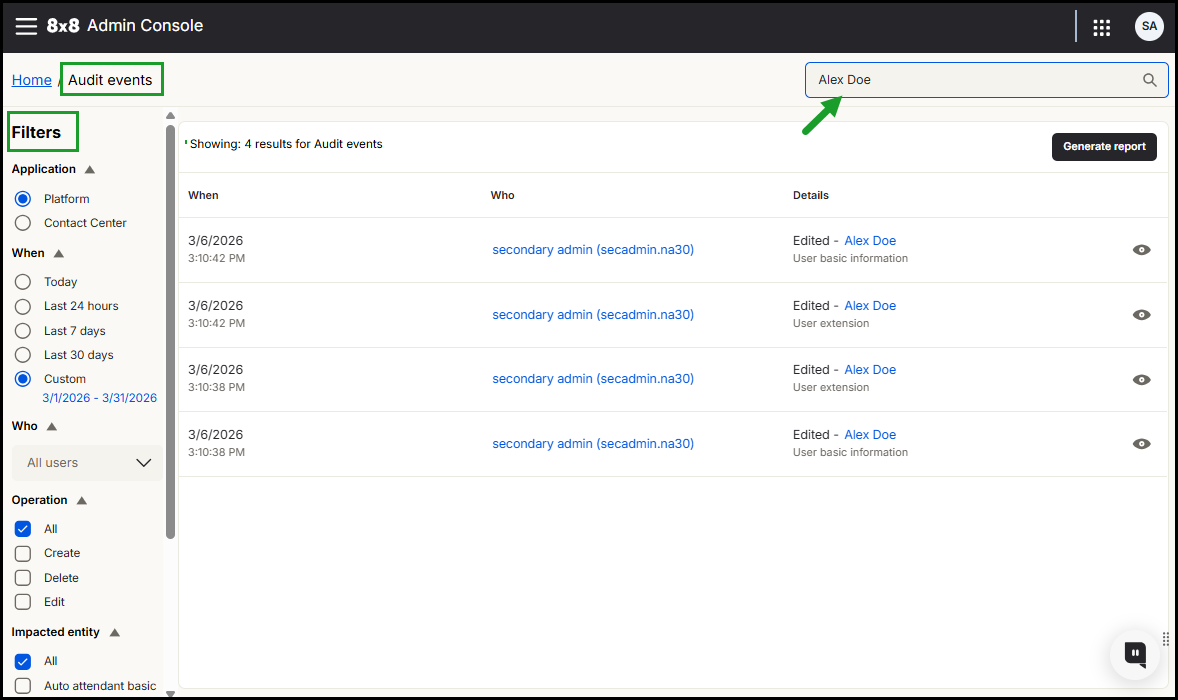
- Use filters to focus on specific audit data. For more details on filtering report data, see Filter audit data for 8x8 Admin Console.
- Date range
- User who made the change
- Impacted entity
The page refreshes automatically to display the matching results.
If no results match your search criteria, a message appears indicating that no audit events were found.
Note: To quickly locate subscription events, use the Impacted entity filter and select Subscription. You can also search for the affected user by name.
You can:
Filter audit data for 8x8 Admin Console
- Applications: Select Platform for Unified Communications (UC) activities (default) or Contact Center for CC-specific administrative logs.
- When: Specify the period during which the event occurred. Options include preset ranges (Today, last 24 hours, 7 days, or 30 days) or a custom range of up to 90 days. Each search query supports a maximum range of 30 days. To retrieve the full 90 days of data, run three separate queries.
- Who: Filter results by the specific administrator or user who initiated the change.
- Operations: Focus on specific action types such as Create, Update, or Delete.
- Impacted Entity: Focus on specific components that were changed. Examples include user or extension info, phone numbers or forwarding rules, ring groups, Auto Attendant details, call queues, or Operator Connect.
Note: To quickly locate subscription events, use the Impacted entity filter and select Subscription. You can also search for the affected user by name.
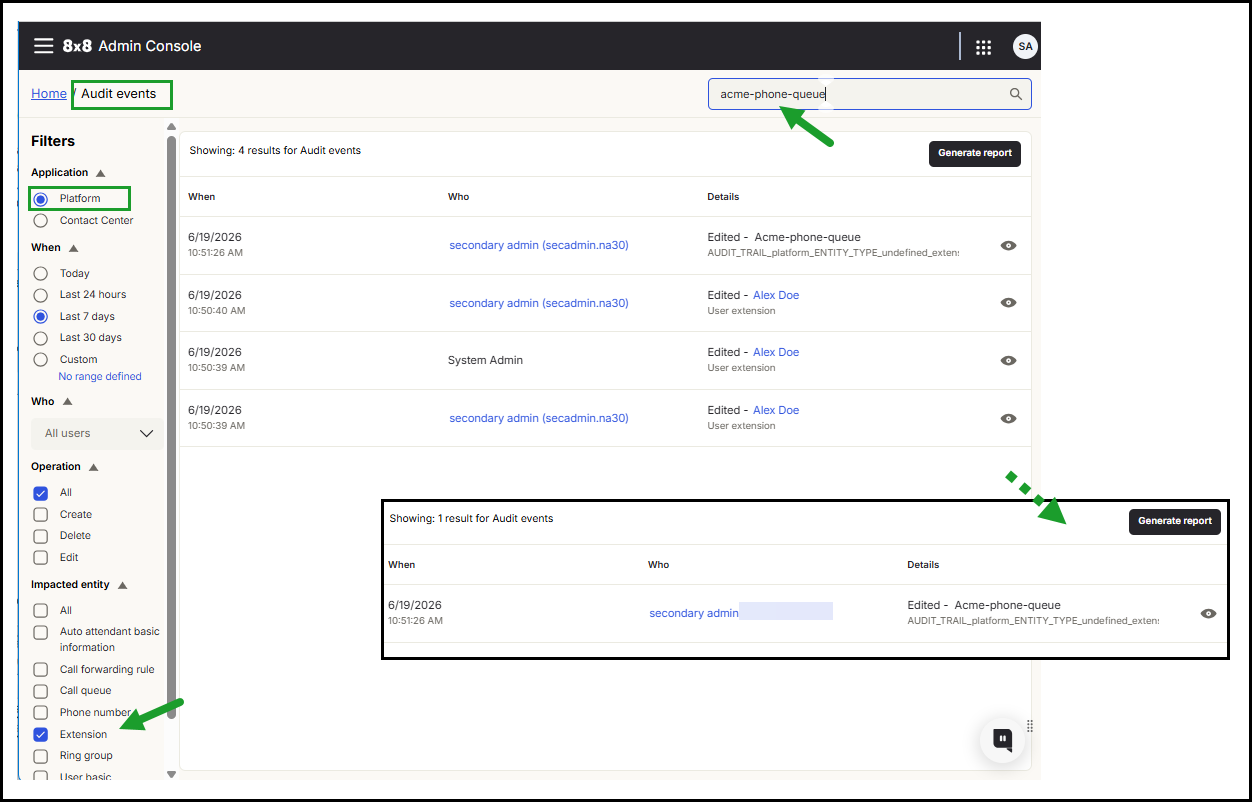
Use the filtering options in the Audit events viewer to narrow the audit event results to specific events.
 View details of a specific 8x8 Admin Console audit event
After applying your filters or searching for a specific entity, the matching audit events appear in the results list. The number of events that match your search is listed in the top left corner of the results list.
Each event includes a summary showing the timestamp, the person who made the change, and the action taken.
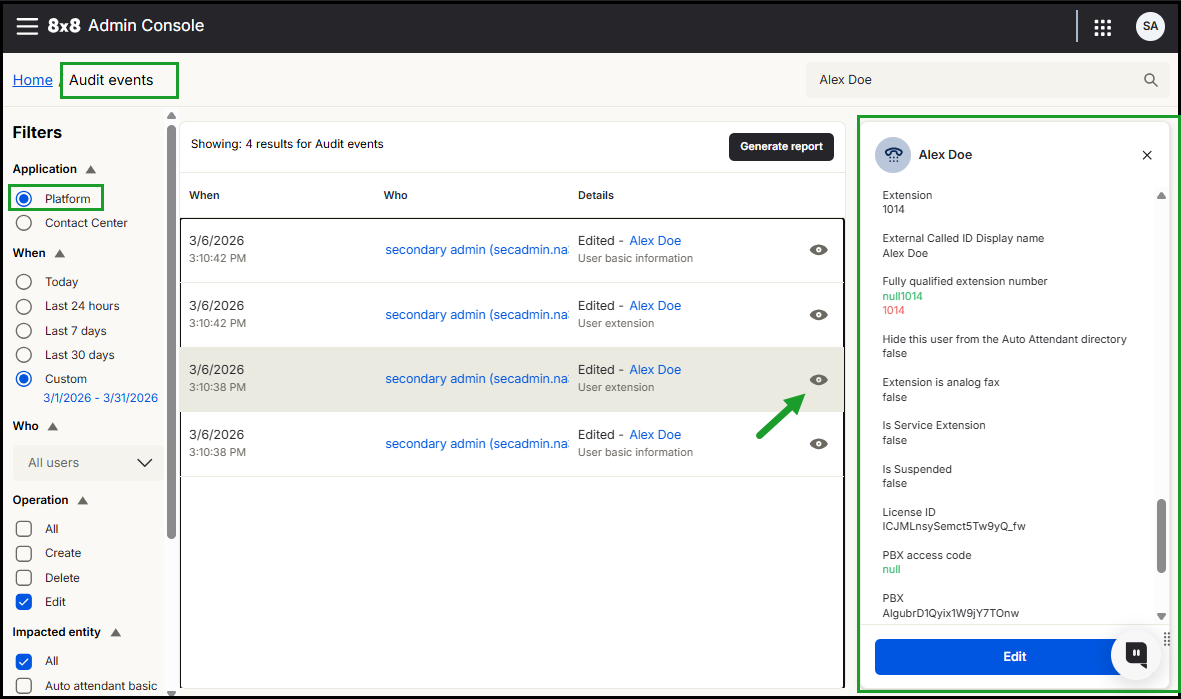
To see the full details of an event for 8x8 Admin Console:
- In the 8x8 Admin Console, menu , go to Audit events.
- On the Audit events page, under Application, select Platform.
- Locate the specific event by using the search tool or by refining the event list.
- Click the event entry or select the View
 icon to open the details.
 -
A side panel opens, displaying the event type, entry name, and specific timestamp.
- Newly added attributes show the new value only.
- Modified attributes display the previous value in red and the current value in green.
-
Click the close
 icon to exit the side panel.
 -
Note: To quickly locate subscription events, use the Impacted entity filter and select Subscription. You can also search for the affected user by name.
 Edit an entry from the audit event for 8x8 Admin Console
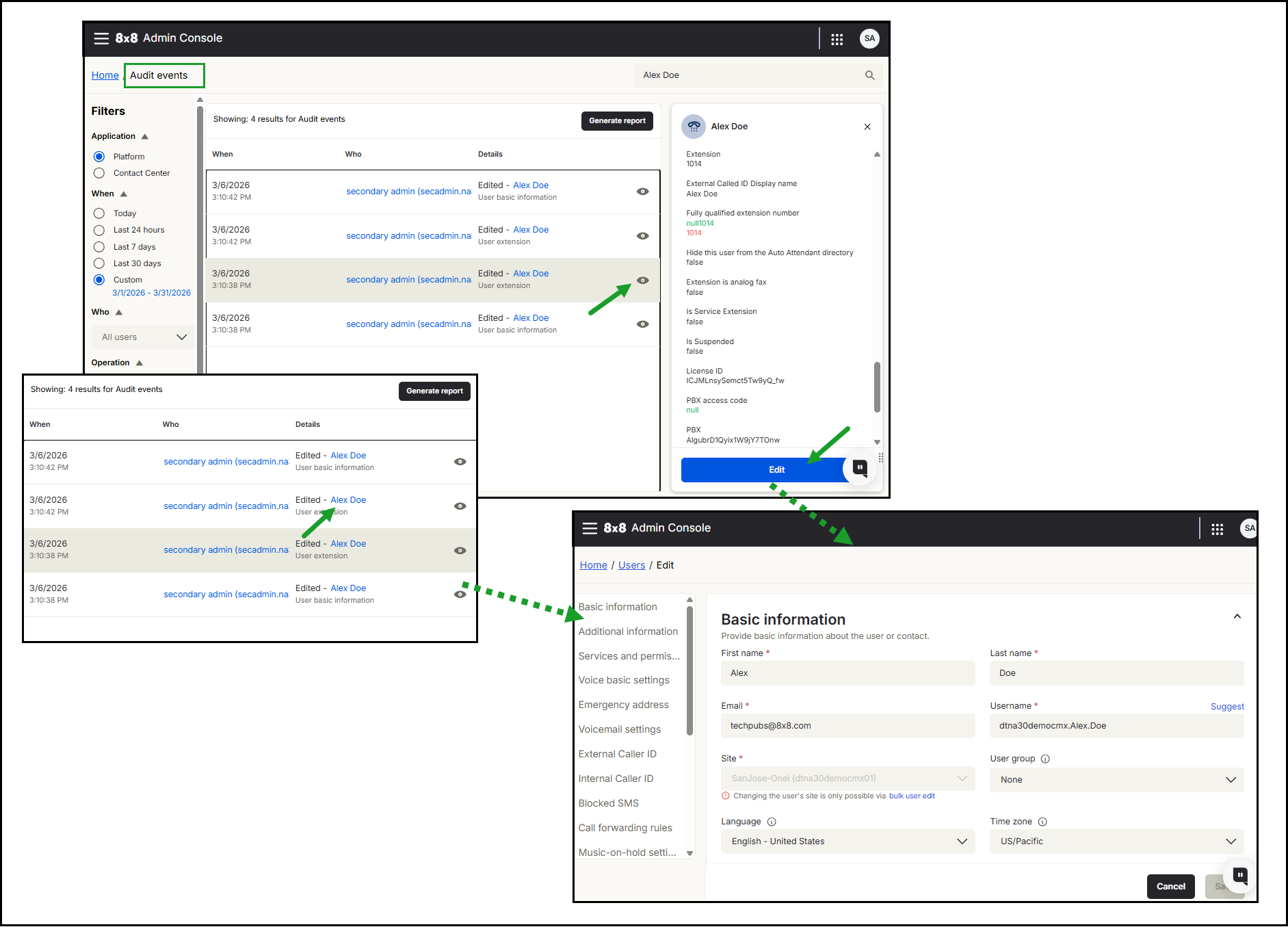
Some attributes reported as changed in Audit events, such as user basic information, call forwarding rules, or extension, can be edited directly from the audit event details panel.
To edit an attribute from an audit event:
- Locate the event in the Audit events results list.
-
Open the event using one of the following options:
- Click the event row or the View icon and click Edit.
- Click the link under the Details column.
- Click the event row or the View
You are redirected to edit the relevant configuration page in the 8x8 Admin Console, where you can update the selected attribute.
Audit events for 8x8 Configuration Manager
Use the Audit events tool to monitor configuration changes and administrative activity within 8x8 Configuration Manager.
Audit events cover
- Configuration changes from 8x8 Configuration Manager.
- Updates to users, agents, queues, and channels.
- All administrative actions within 8x8 Contact Center.
Additional notes
- Audit events show the final state of the entity, not a comparison of previous and updated values.
- Audit events are generated from the time the feature is enabled. Historical data before enablement is not available.
- The 8x8 Admin Console displays up to three months of data. Additional historical data may be available through APIs.
- Audit events may require a manual refresh to appear.
- Multi-region environments require region selection.
Access audit events for 8x8 Configuration Manager
To access 8x8 Configuration Manager audit events in the 8x8 Admin Console:
- Log in to your 8x8 Admin Console account.
- From the menu , go to Audit events.
-
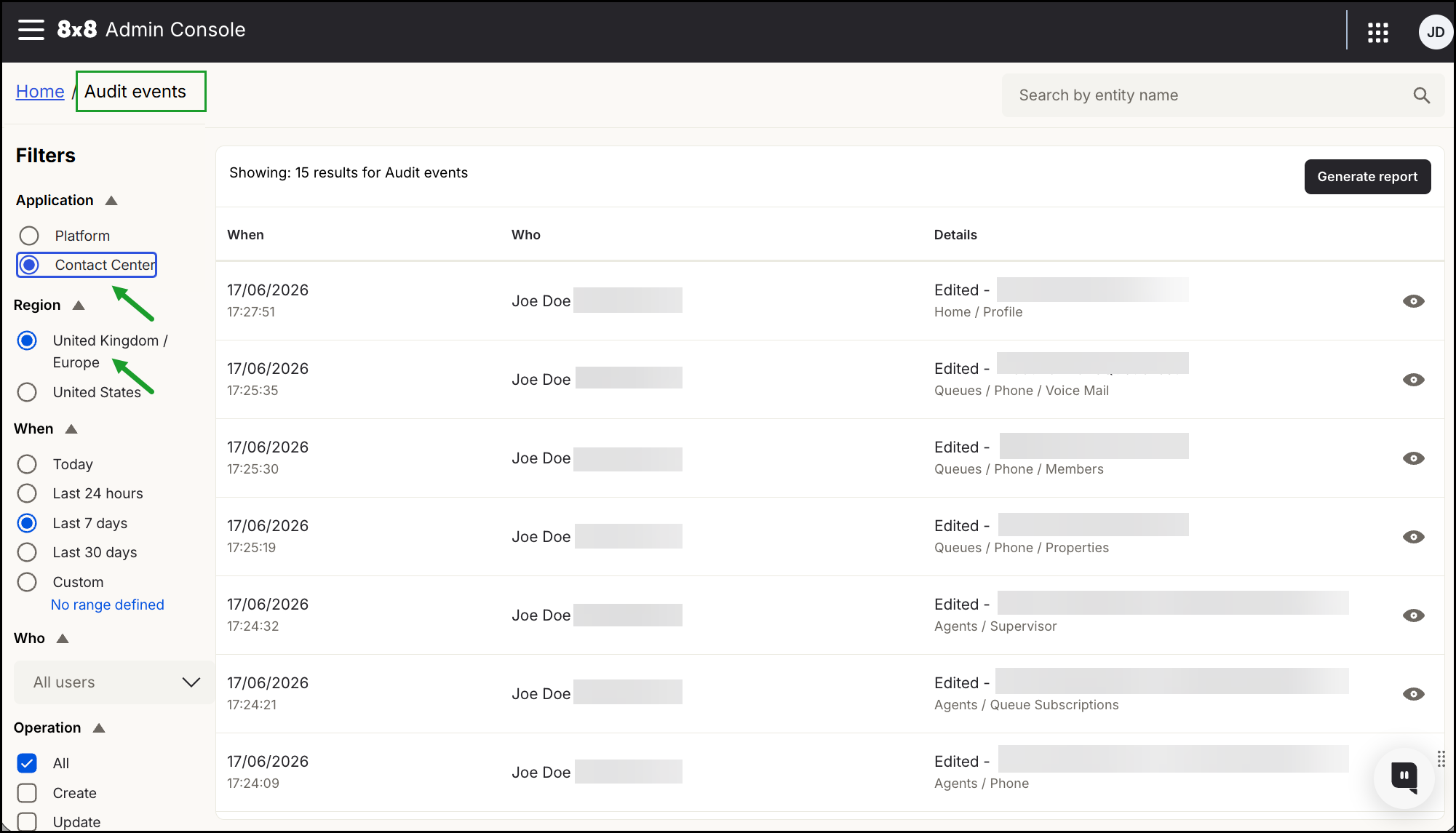
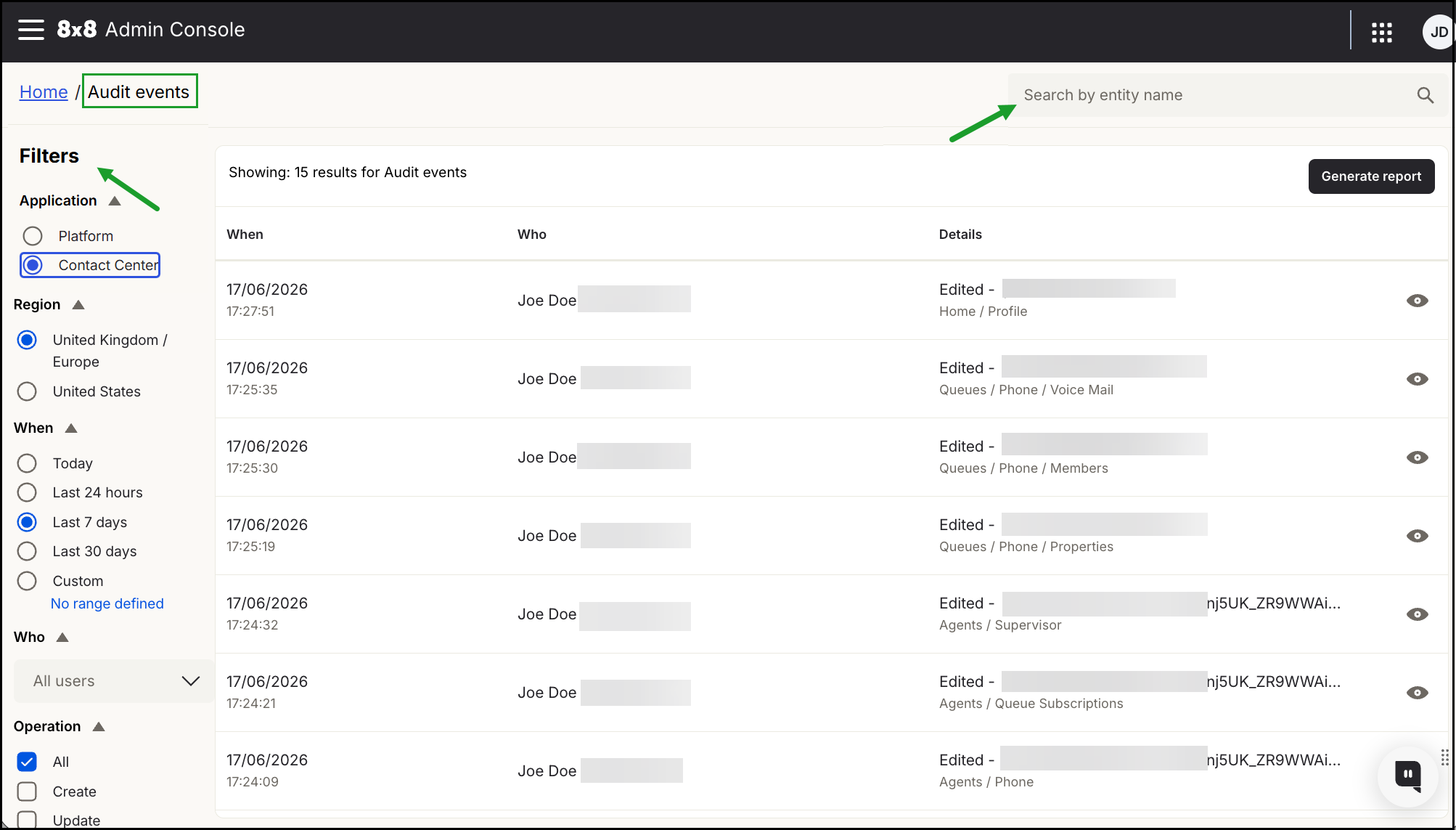
On the Audit events page, use the Filters panel to focus on specific audit data:
- Application: Select Contact Center.
-
Region (for multi-tenant customers only): Select a specific region if your environment uses multiple regions.
Notes:
- This filter is only displayed for multi-tenant customers.
- If your environment has a single region, the region filter does not appear
For more details on filtering report data, see Filter 8x8 Configuration Manager audit data.
The page refreshes automatically to display the matching results. If no results match your search criteria, a message appears indicating that no audit events were found.
You can:
Filter audit data for 8x8 Configuration Manager
Use the filters in the left-hand panel to narrow your search results.
Applications: Choose Platform for Unified Communications (UC) activities (the default) or Contact Center for CC-specific administrative logs.
Region: If your environment is configured for multiple regions, use this to isolate data for a specific geographic location. Available regions (based on active tenants) may include: United Kingdom / Europe, United States, Canada, or Asia/Pacific.
When: Specify the period during which the event occurred. Options include preset ranges (Today, last 24 hours, 7 days, or 30 days) or a custom range of up to 90 days. Each search query supports a maximum range of 30 days. To retrieve the full 90 days of data, run three separate queries.
Who: Filter results by the specific administrator or user who initiated the change.
Operations: Focus on specific action types such as Create, Update, Delete, or Bulk operations.
Impacted Entity: Focus on specific components that were changed. Examples include users, agent groups, queues, channels, scripts, CRM properties, campaigns, integration, chat design, and more.
Alternatively, use the Search tool at the upper right to locate changes tied to a specific entity name.
View details of a specific 8x8 Configuration Manager audit event
After applying your filters or searching for a specific entity, the matching audit events appear in the results list. The number of events that match your search is listed in the top left corner of the results list.
Each event includes a summary showing the timestamp, the person who made the change, and the action taken.
To see the full details of a CC event:
- From the 8x8 Admin Console, menu , go to Audit events.
-
On the Audit events page, use filters to focus on specific audit data:
- Application: Select Contact Center.
- Region (applicable only to multi-tenant environments): Select the specific region you wish to review.
- Locate the specific event by using the search tool or by refining the event list.
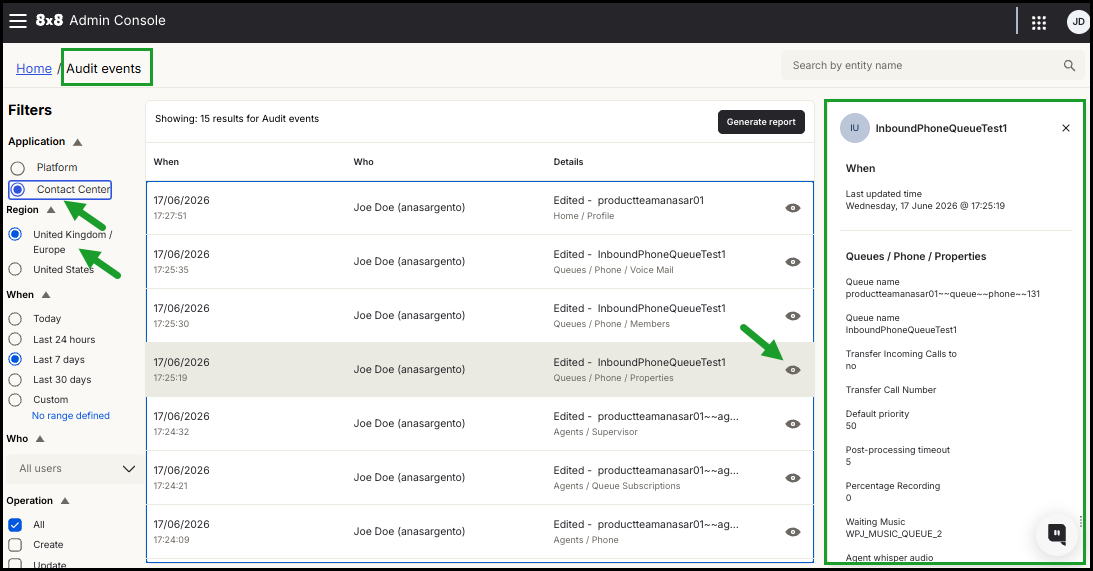
- Click the event entry or select the View icon to open the details.
-
A side panel opens, displaying the event type, entry name, and timestamp.
Note: The panel displays the final state of the entity. A comparison of previous and updated values is not available.
-
Click the close
icon to exit the side panel.
Generate an audit events report
Customer administrators with appropriate permissions can generate a CSV report of audit events. This enables self-managed audit data for data governance, retention requirements, and processing in external audit tools. The report includes all columns currently visible in the audit events table. This is useful for long-term storage and offline analysis.
Generate an audit events report
-
From the 8x8 Admin Console, menu
, go to Audit events.Apply the desired filters on the Audit Events page.
-
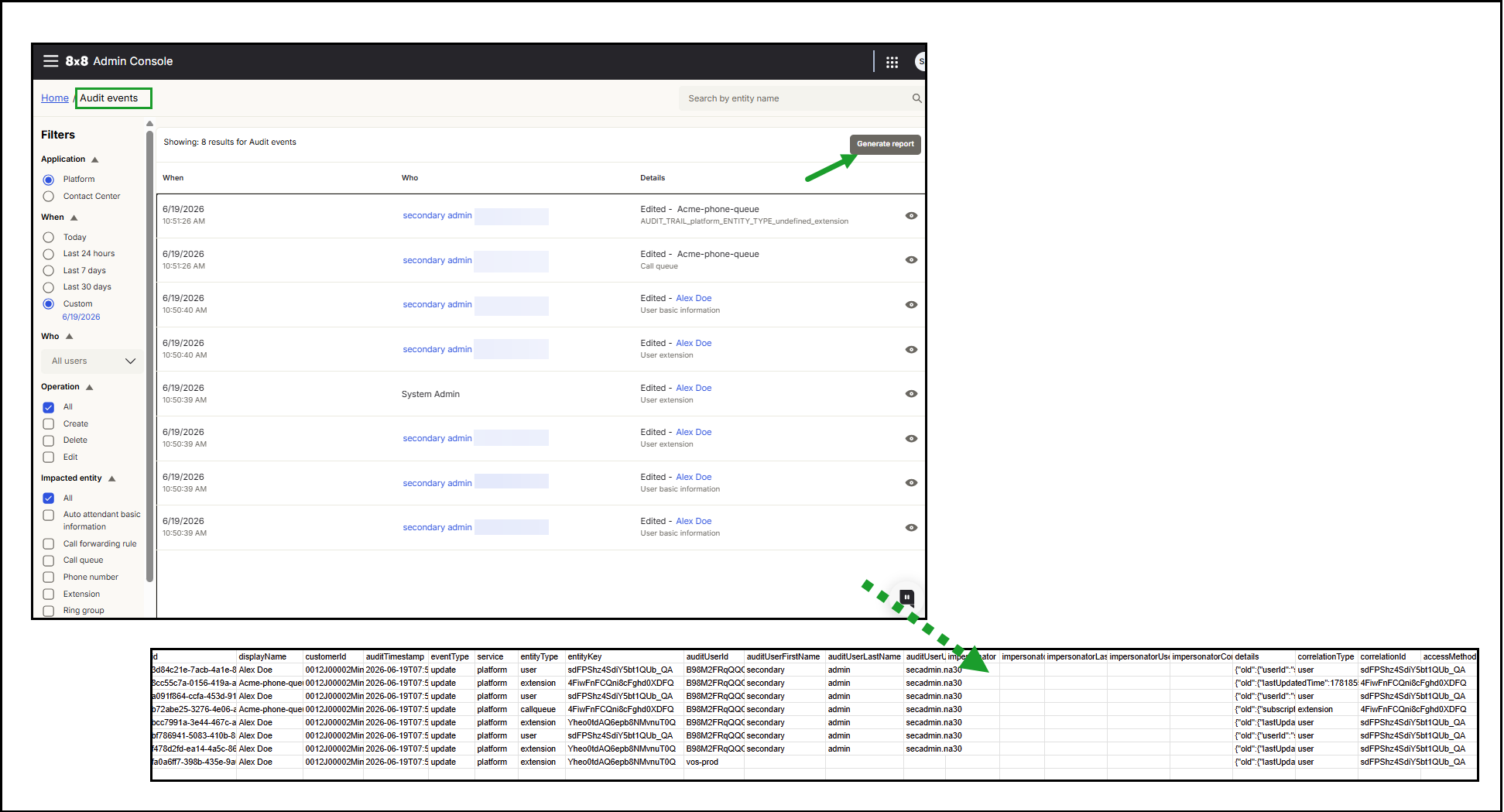
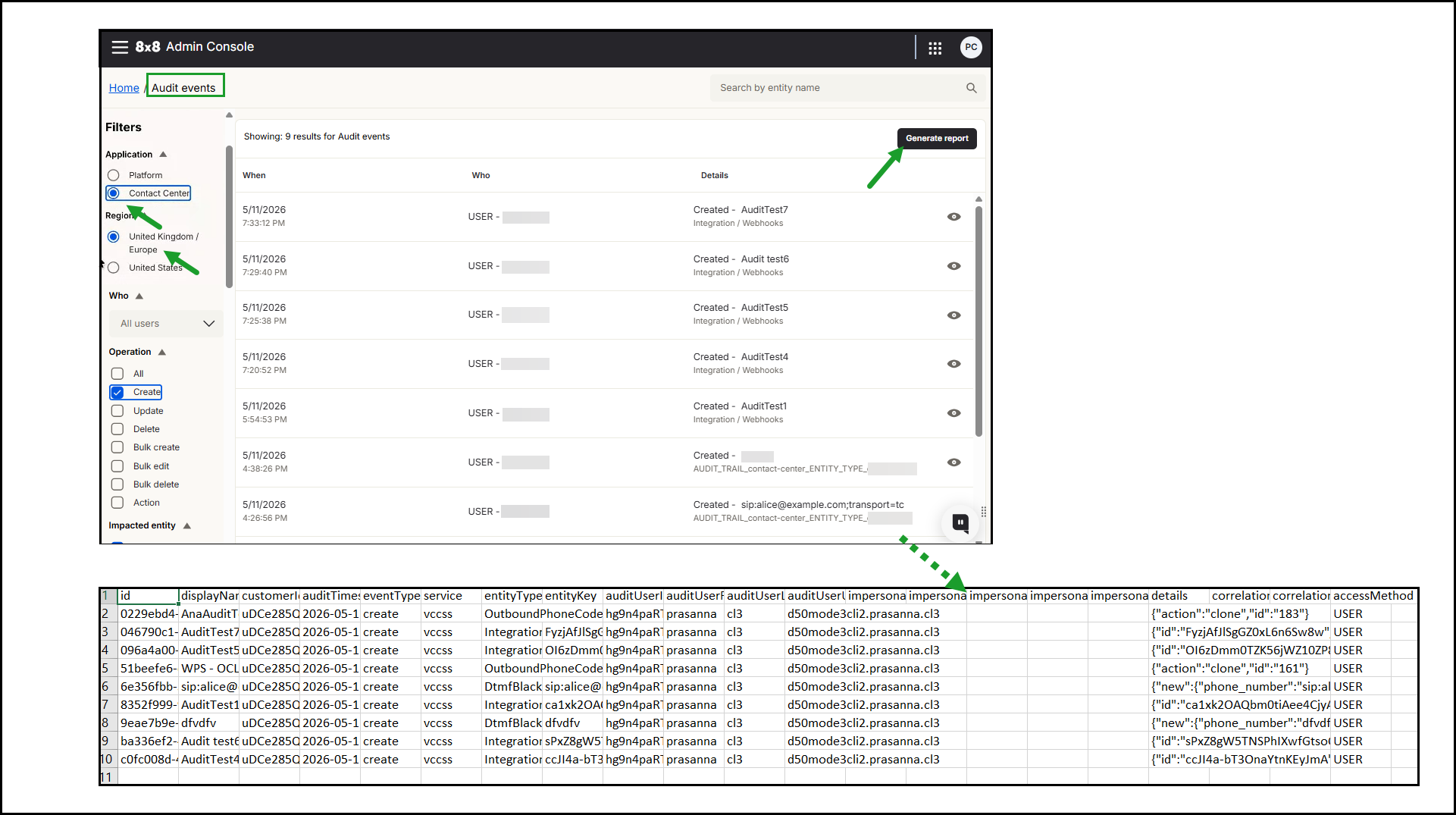
Click Generate report in the upper right corner of the events table. A CSV report is generated.
-
Click Download and save the CSV report locally.
Notes:
- The report contains a maximum of 50.000 rows.
- The output contains identifiers and details in JSON format.
The following image shows the Generate report option for 8x8 Admin Console audit events.
The following image shows the Generate report option for 8x8 Configuration Manager audit events.
Audit events report column descriptions
Many columns provided in the Audit events CSV report contain internal identifiers (alphanumeric) to ensure consistency and strict accuracy of the audit data. In many cases, the human-readable version is available in the details column.
Note: Upcoming versions of the audit report will include human-readable formats for all fields.
The following table describes the fields in the audit events report. Download the CSV report and save it locally for further use.
| Column |
Description |
|---|---|
| displayName | The human-readable form of the entityKey (where applicable). For example, if the entityType is user, this will contain the user’s first and last name |
| cusytomerID |
The 8x8 customer ID associated with this audit event If this value is empty, Audit Service will use the cid from the auth token's claim to populate it. |
| auditTimestamp | The date/time (in UTC) when the event was registered. |
| eventType | Specifies how the event changed/accessed the entity: create, update, delete, read, export. |
| service |
Specifies which 8x8 service was involved in the event. Current values include platform (changes made in the 8x8 Admin Console) and VCCSS (changes made in 8x8 Configuration Manager). |
| entityKey | The identifier of the entity that was changed/accessed in this audit event. |
| entityType | Specifies the type of entity that was changed/accessed in this audit event. For example, user, extension, and call forwarding. |
| auditUserId | The identifier of the user who made the change (or accessed the record). |
| impersonator |
In cases where other users (8x8 support user or partner user ) make changes on behalf of customer administrators (for example, as a result of a support request), the impersonator column will contain the identifier of the user who made the change. When Impersonating from Salesforce, the impersonator should have the impersonator's Salesforce userId. |
| details |
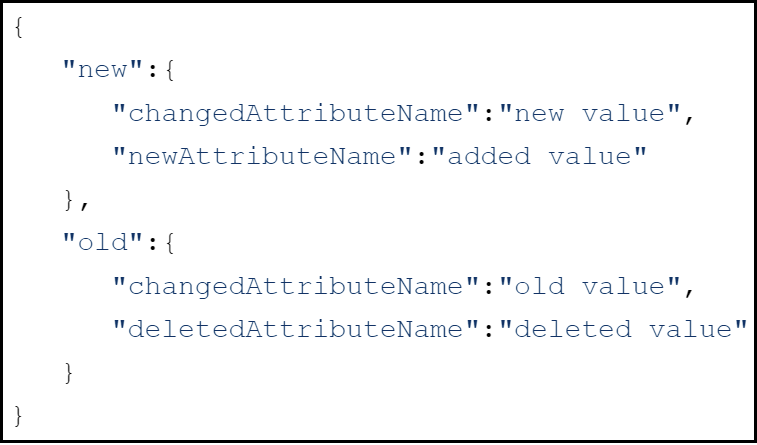
Contains detailed information on which attributes of the changed entity were updated. For 8x8 Admin Console audit events, this field is in JSON format:
- The “new” object contains all of the newly-added attributes and the new value of changed attributes. - The “old” object contains all of the deleted attributes and the old value of changed attributes. For 8x8 Configuration Manager audit events, only the final state of the entity is displayed. A comparison of previous and updated values is not available. |
| correlationType |
When several changes are made to various entities as part of one change set, the correlationType displays the parent entity type. For example, if an extension was assigned to a user during a user creation flow, the entityType would be “extension”, and the correlationType would be “user. |
| correlationID | The identifier of the parent entity of this change. |
| accessMethod | Shows the specific gateway or application interface used to perform the configuration change, indicating whether the administrative action was triggered manually or programmatically. |