Grant Essentials and Supervisor access to Analytics for 8x8 Work
In Analytics for 8x8 Work access is available at two levels:
- Analytics: Essentials
- Analytics: Supervisor
Each level provides different dashboards and reports within your organization’s 8x8 cloud phone system. Permissions are assigned in the 8x8 Admin Console and determine which users can view summary reports, call quality data or advanced insights into queue and ring groups.
Access Levels
 Analytics: Essentials
Designed for general users who need visibility into basic call activity and extension-level details.
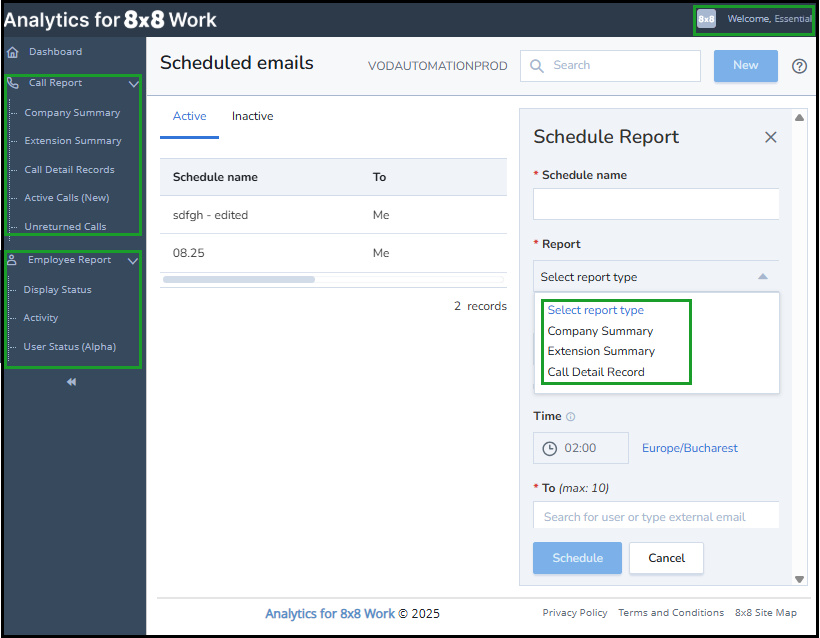
- Includes: company-wide summaries, extension reports, and call detail records (CDRs).
-
Shows Ring Group and Call Queue extensions in summaries and call journeys, but does not provide aggregated performance metrics.
- Ideal for employees who need visibility into their own calls and basic reporting.
Note: Essentials users can view Ring Group and Call Queue extensions in summaries and CDRs, but these do not reflect true group performance metrics. They only show call flows and extension-level activity.
Report categories available with Essentials:
- Call Report, including Campaign Summary, Extension Summary, Call Detail Records (CRDs), Active Calls, Unreturned Calls
- Employee Report
- Scheduled Report Emails (limited to Essentials data)
 Analytics: Supervisor
Designed for team leads, managers, or admins who require advanced insights.
- Includes everything in Essentials, plus detailed ring group, call queue, and quality reports.
- Provides aggregated group performance metrics for monitoring and optimization.
- Best for supervisors who need to manage call performance and quality at scale.
Report categories available with Supervisor:
- Call Report, including Campaign Summary, Extension Summary, Call Detail Records (CRDs), Active Calls, Unreturned Calls
- Call Quality
- Call Queue
- Ring Groups Summary
- Employee Report
- Device Report
- Business Hours Report
- Schedule Report Emails of all data types

Essentials vs Supervisor comparison
| Report Categories | Essentials | Supervisor |
|---|---|---|
| Call Report: Company Summary, Extension Summary, Call Detail Records (CRDs), Active Calls, Unreturned Calls | Yes | Yes |
| Call Quality: Call Quality Trend, Call Quality Detail | No | Yes |
| Call Queues | No | Yes |
| Ring Groups Summary | No | Yes |
| Employee Report: Display Status, Activity, User Status | Yes | Yes |
| Device Report: Device Status | No | Yes |
| Business Hours Report | No | Yes |
| Schedule Report Emails | Limited | All reports |
Note: When a report reaches End of Life (EOL), it will be removed and replaced by an updated report or dashboard. While the new reports are in Beta, the legacy reports remain accessible.
When to use Essentials vs Supervisor
- Assign Essentials → to employees who need basic visibility into their own calls and activity.
- Assign Supervisor → to managers, leads, or admins who need access to performance metrics, call quality data, and aggregated group reporting.
- Super-admins automatically have access to all PBXPrivate Branch Exchange—a private telephone network used within a company. data across the organization.
Note: Assign Supervisor access carefully, as it includes sensitive call quality and group performance data.
Grant a user access to Analytics for 8x8 Work
To grant a user access to Analytics for 8x8 Work:
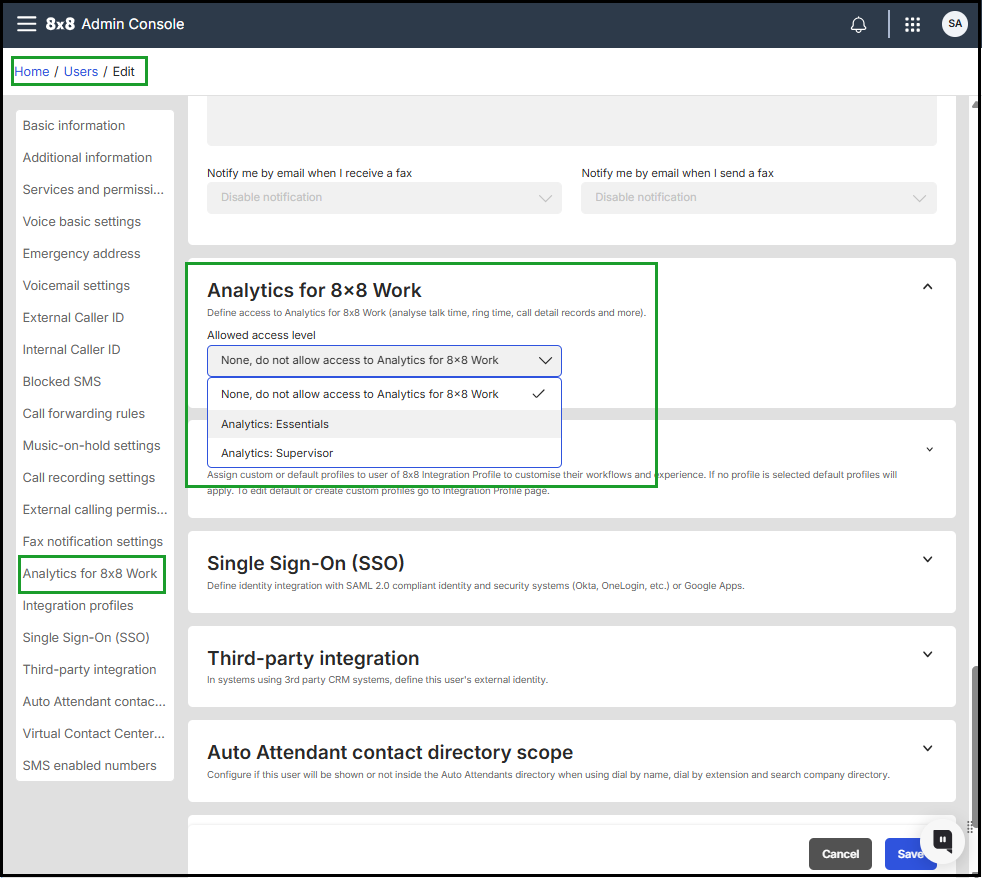
- Log in to the 8x8 Admin Console with an administrator account.
- Go to the Users page and select the user.
- In the user’s edit window, go to the Analytics for 8x8 Work section.
- From the Allowed access level list, select Analytics: Essentials or Analytics: Supervisor.
- Click Save.
Note: Changes take effect within five minutes.
 PBX Data Access Rules
- Users can access PBX data for their assigned site.
- Super-admins can access all PBXes in the organization.
For more information, see: 8x8 Admin Console: Role-Based Access Control (RBAC), and 8x8 Admin Console: Control access to Analytics for 8x8 Work data by user roles and permissions.


