Note: AI Studio is an Early Access Program (EAP) product. Features may change after this documentation is published. If a feature is not included in this guide, use the built-in AI Builder to explore available capabilities.
Tour the interface
When you open the 8x8 AI Studio app, the Home dashboard provides access to your agents, tools, and automation resources, along with usage insights and navigation options.
Use this page to monitor activity, access key features, and navigate to different areas of the platform.
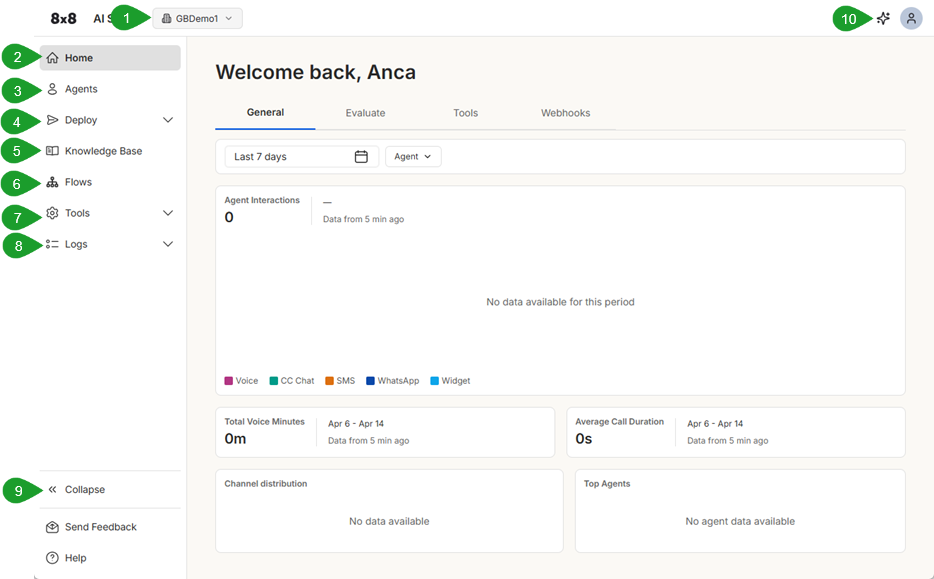
- Tenant selector: Switch between your organization and personal workspace. Each tenant has its own agents, tools, and configurations.
- Home: The dashboard displays a summary of your workspace, including recent activity and usage insights.
- Agents: Create and manage AI agents. Use this section to define agent behavior, prompts, and capabilities.
- Deploy: Access deployment-related components for your AI agents, including Voice Connectors and Webhooks. Use this section to configure how agents connect to phone numbers, messaging channels, and external systems, and to control how interactions are triggered and routed.
- Knowledge Base: Manage data stores that agents can use to retrieve information and answer questions.
- Flows: Create and manage call flows (IVR scripts) for structured voice automation and routing.
- Tools: Define actions that agents can perform, such as retrieving data, calling APIs, or updating systems.
- Logs: View interaction history, including conversations, tool usage, and errors for troubleshooting.
- Collapse/Expand: Collapse or expand the sidebar navigation to adjust your workspace view.
- AI Builder: Toggles the built-in AI chat assistant on/off. It answers questions, helps you create, configure, and manage agents by generating prompts, building tools, writing webhooks, and guiding you through setup tasks.


