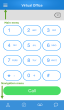
The 8x8 Virtual Office application provides a user interface (UI) custom-designed for 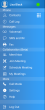
Tap  to open the main menu. The main menu options allow you to access the following:
| Menu Item | Functionality |
|---|---|
| Profile Picture | Access and edit profile picture from the top-left corner of the home screen. Tap to view and edit the photo. |
| Presence Status | View and change your presence status from the top-right corner of the home screen. Tap to open and change the status. |
| Contacts | Access your Contact de l'entreprise and personal contacts. |
| Call Log | Access a list of recently processed inbound and outbound calls from the app. |
| Voicemail | Listen to voicemail, and call back, mark voicemail as read or unread, or delete. |
| SMS and IM | View, respond to, or write new messages. |
| Fax | View received and sent faxes. |
| Meet Now | Launch a Conférence Virtual Office. |
| Join Meeting | Join a Conférence Virtual Office using a meeting ID. |
| Schedule Meeting | Schedule a Conférence Virtual Office. |
| My Meetings | View a list of your past, active, and upcoming Conférence Virtual Offices. |
| Call Mode | Choose Wi-Fi or cellular mode for your inbound and outbound calls. |
| Settings | Access settings for call forwarding, contact display, video settings, and more. |
| Help | Access the Virtual Office FAQ, user guide, and feedback form. |
| Log Out | Disable extension-related activity. |
The navigation menu allows you to perform the following functions:
| Navigation Icon | Functionality |
|---|---|
|
|
Contacts: Access your contacts from the Contact de l'entreprise as well as personal contacts. |
|
|
Call Log: Access a list of recently processed inbound and outbound calls from the app. |
|
|
Voicemail: Listen to voicemail, call back, mark voicemail as read or unread, or delete. |

|
SMS and IM: View, respond to, or write new messages. |


Retrieve Account Information
You can retrieve your Virtual Office account details, such as phone number and extension number, under Contacts > Company.
 Voir aussi
Copyright © 2017 8x8, Inc. Tous droits réservés – Version 7.0